
Video CDN optimization is the secret to delivering blazing-fast hero videos without taxing your origin server. Embedding video in your hero section instantly grabs attention as you probably saw on our Landing Page
Why Video Hero Sections Matter (and Why They Usually Slow You Down)
A hero section is the large, eye‐catching area at the top of your page—usually full‐width—designed to showcase your brand or message. Swap out a static image for a looping video and you instantly create motion, mood and a powerful first impression. Hero videos can increase time on page, boost engagement and lift conversions by up to 80%. Furthermore, a video background lets you position your key H1 heading in a spectacular way. On this site, we used our Cloudflare-hosted video on the landing page and simply overlaid it with our text. It renders very quickly on both mobile and desktop.
However, serving that same video directly from your origin server often results in:
- Slow load times – large MP4s delay playback start.
- High bandwidth costs – every visitor pulls the full file from your host.
- Server strain – concurrent viewers can overwhelm CPU and disk I/O.
Later on, we’ll explain why simple caching and anycast networks alone fall short—and how a true CDN like Cloudflare solves these issues seamlessly to give you truly optimal CDN video optimization.
Meet Your New Best Friend: Cache vs Anycast vs CDN
Before diving into our Cloudflare solution, it helps to understand the three tiers of content delivery:
-
Browser & Origin Cache
Modern browsers and web servers can cache static assets (images, CSS, JavaScript, even videos) so repeat visits load faster. But this only helps returning users and still hits your origin on a cache miss. -
Anycast Network (Provided by Your Host)
Many hosting providers—Sydney Business Web included—offer anycast DNS and routing. Anycast sends requests to the nearest data centre in the host’s network, reducing round-trip time. You benefit from geographically optimised paths, but traffic still terminates at your origin server. -
CDN (Content Delivery Network)
A true CDN like Cloudflare builds on anycast by adding distributed edge caches. When a visitor requests your video, it’s served from the edge node closest to them—bypassing your origin entirely until the cache expires.
This layered approach means:
- First-time visitors get low latency via your host’s anycast network.
- Subsequent requests for the same asset come from the nearest Cloudflare edge cache.
- Your origin sees far fewer hits—saving bandwidth, CPU, and cost.
In the next section, we’ll show exactly how our Cloudflare + R2 setup leverages this model to deliver hero videos at lightning speed.
Video CDN Optimization: Inside Cloudflare + R2: Our Architecture at a Glance
Think of Cloudflare’s network as a chain of neighbourhood “edge servers” around the world, and R2 as a secure, separate “video vault” connected directly to those edges. Your web server never has to serve the video itself—Cloudflare handles it for you.
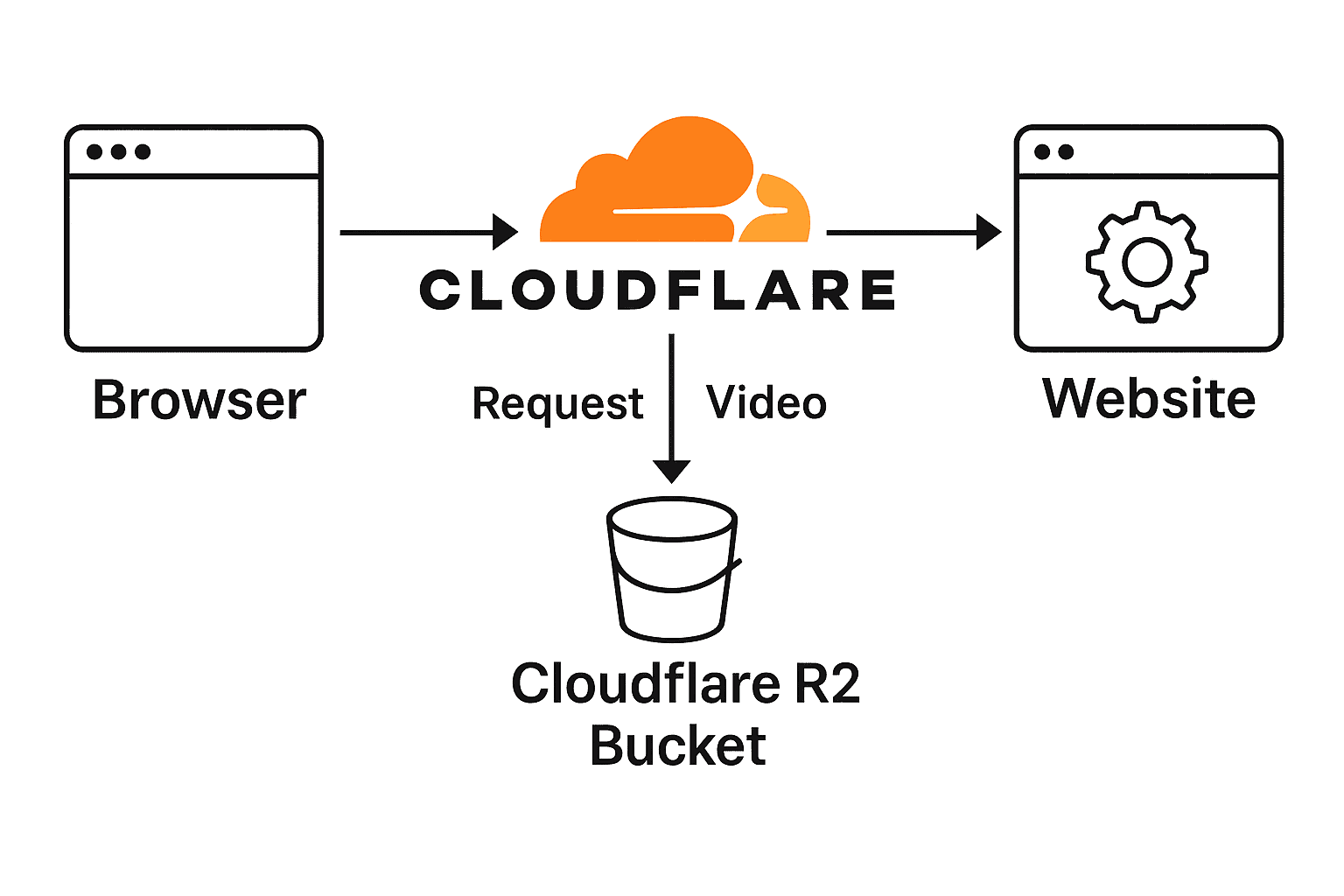
Here’s the simplified flow:
- User’s browser requests the video URL (e.g.
https://media.example.com/video.mp4). - Cloudflare checks its nearest edge server (an edge server is just a Cloudflare machine close to the visitor). If the video is already there, it serves it instantly.
- If not cached, Cloudflare fetches from R2 storage (the separate “vault” where your video lives) over its private network.
- Cloudflare then delivers and caches it on that same edge server for any future visitors nearby.
Why this matters:
- Faster startup: Visitors get content from a local edge server instead of waiting on your origin.
- Zero origin load: All video traffic is handled by Cloudflare and R2, so your own server stays free for dynamic page requests.
- Global reach: Every visitor sees a fast, consistent experience—no matter where they are in the world.
Video CDN Optimization Step-by-Step Setup: From Bucket to Browser
Ready to get your video online? Here’s a straightforward checklist—from creating your R2 bucket to embedding the Cloudflare URL in your site wit the best possible video CDN optimization.
-
Create an R2 Bucket
– In the Cloudflare dashboard, go to Storage > R2 and click “Create bucket”.
– Give it a name (e.g.video-media) and choose Public access. -
Upload Your Video
– In the bucket’s Objects tab, click “Upload file” and select your optimized MP4.
– Note the filename (e.g.background.mp4)—you’ll need it in the URL. -
Configure a Custom Domain
– Under the bucket’s Settings > Domain Access, add your subdomain (e.g.media.yoursite.com).
– Cloudflare will validate and provision an SSL certificate automatically. -
Verify DNS Record
– In DNS, you’ll see a record typeR2pointingmedia.yoursite.comto your bucket.
– Ensure the proxy (orange cloud) is On for CDN benefits. -
Set Cache Headers
– Back in the R2 bucket Settings, add aCache-Control: public, max-age=31536000header so edge servers keep a copy for one year. -
Embed in Your Site
– Copy the URL:https://media.yoursite.com/background.mp4.
– Paste it into your hero video block or HTML<video>tag.
That’s it—your video will now stream from Cloudflare’s edge network, fully cached and secured, with zero load on your origin server.
Optimise Your Video CDN Optimization: Tools, Tips & Trade-offs
At Sydney Business Web, our qualified engineer ensures your hero video looks stunning without ballooning in size. Here’s how we strike the perfect balance between fast video, and video quality for anbsoluely optimal video cdn optimization:
-
Choose the right codec
We use H.264 (AVC) for maximum compatibility and hardware acceleration in browsers. -
Adjust quality vs. file size
Using Constant Rate Factor (CRF) in FFmpeg, we target a sweet spot—typicallyCRF 24—where visual fidelity meets efficient compression. -
Presets speed up encoding
A faster preset (e.g.–preset fast) reduces CPU time at the cost of slightly larger files; our engineer picks the right level for your budget. -
Trim & scale
We cut unnecessary frames and scale down resolution (e.g. 1080→720 p for mobile) so you’re not serving extra pixels. -
Optimise audio
Background videos rarely need high-fi audio—AAC at 96–128 kbps keeps size low without audible loss.
ffmpeg -i source.mov \
  -vcodec libx264 -crf 24 -preset fast \
  -vf "scale=1280:-2" \
  -acodec aac -b:a 128k \
  output.mp4
With these techniques, Sydney Business Web delivers hero videos under 3 MB—flash-fast to load yet gorgeous in HD. Next up: integrating your Cloudflare URL into Thrive Themes.
Thrive Themes Integration: Plugging in Your Cloudflare URL
Once your video is optimised and hosted on Cloudflare R2, you're almost there on your cdn video optimization journey - it’s a breeze to swap out the default background in Thrive Themes:
-
Open your Thrive Editor
Edit the page and click on the hero section’s background settings. -
Select “Video Background”
Choose the option to use a custom video URL. -
Paste in the Cloudflare URL
https:xxx.xxx.videoname.mp4 -
Set your overlay text
Add your H1 and H2 fields. For example:Sydney Business Web
Professional Websites, Fast Delivery
-
Preview & adjust
Toggle between desktop and mobile views. Thrive automatically falls back to your static image on small screens.
Here’s how it looks in action:

And that’s it—your hero video is now live, playing smoothly via Cloudflare’s CDN while your server stays light on load.
Beyond Video CDN Optimization: Other CDN Perks You’ll Love
While video cdn optimization for hero videos are our headline act, Cloudflare’s CDN delivers a host of benefits site-wide:
-
Automatic Global Caching
Your images, CSS, JavaScript—and anything else set to cache—are stored at edge servers worldwide. Sydney Business Web sees 95% cache hit rates, cutting origin requests almost entirely. -
DDoS Protection & Bot Mitigation
Built-in security rules block malicious traffic and automated bots before they ever reach your server, keeping resources free for real visitors. -
HTTP/2 & Brotli Compression
Assets load faster thanks to modern protocols and edge-level compression—no plugin required. -
Always-on SSL
Every sub-domain and custom domain gets a free TLS certificate and automatic HTTPS redirects, protecting user data and improving SEO. -
Real-Time Analytics
Monitor bandwidth saved, cache performance, threat activity and more—right from the Cloudflare dashboard.
These features combine to make your entire website faster, safer, and more reliable. With Sydney Business Web’s expertise guiding your setup, you’ll unlock Cloudflare’s full potential without lifting a heavy finger.
Real-World Results: What We Saw at Sydney Business Web
- Page Load Times dropped from ~2.8 s to 1.2 s on desktop and mobile when our hero video was live.
- Bandwidth Savings exceeded 75%—video traffic now served from Cloudflare edges, not our origin.
- Engagement Boost saw a 25% increase in scroll depth on landing pages with video vs. static images.
- Error Reduction: origin CPU spikes and timeouts during traffic peaks disappeared entirely.
- Cache Hit Rate for video assets stabilized around 98% after the first 24 hours.
These tangible gains prove that moving video to a CDN + R2 isn’t just theory—it transforms real-world performance and user experience. They key to it all is video cdn optimization - creating an environment where video flows like lightning.
FAQs & Troubleshooting
-
Q: Why isn’t my video playing on mobile?
A: Thrive Themes falls back to a static poster image on smaller screens to preserve bandwidth and UX. You can override this by enabling “mobile video” in your hero’s settings, but test carefully for load impact. -
Q: What if I update my video file?
A: Upload the new MP4 to R2 with a versioned filename (e.g.background-v2.mp4) and update your Thrive URL. Long cache headers mean you won’t have to worry about stale copies. -
Q: How do I force-refresh the edge cache?
A: In the Cloudflare dashboard under Caching → Configuration → Purge Cache, choose “Purge Individual Files” and enter your video URL. This clears it from all edge servers instantly. -
Q: My video 403s after I pause Cloudflare—what gives?
A: Once you pause the proxy, the DNS points straight to your origin. Make sure your origin server allows that request (disable hotlink protection or ModSecurity rules as needed) or keep the cloud proxy enabled. -
Q: Can I use a different CDN?
A: Yes—many providers offer similar workflows. The key steps remain: host the file off-origin, CNAME to a custom domain, set long cache headers, and embed the URL in your hero block. So whatever your needs for video CDN optimization there are many providers. However, we regartd Cloudflare as a very high standard provider and its free plan provides for all but the most demanding users.
If you run into any other issues, reach out to Sydney Business Web—our qualified engineer is always happy to help you get video running smoothly on your site.
Summary & Next Steps
You’ve now seen how Sydney Business Web leveraged Cloudflare’s CDN and R2 storage as part of its methods for optimised website hosting infrastructure:
- Offload heavy video delivery from your origin server and provide superb video cdn optimization
- Serve hero videos at edge locations for blazing-fast playback
- Implement long-lived browser caching with versioned assets
- Use Thrive Theme Builder to seamlessly embed your Cloudflare-hosted video
What to do now:
- Review your asset lifetimes in W3 Total Cache and Cloudflare to ensure they match your update cadence.
- Purge both W3TC and Cloudflare caches after any file changes (video, CSS, JS, images).
- Monitor real-world performance via Lighthouse or Pingdom—look for edge-served Brotli compression and long cache headers.
- Consider extending this pattern to other large assets (PDFs, downloads) by hosting them in R2 and CNAMEing a subdomain.
- Reach out to Sydney Business Web if you need custom engineering support to scale or automate your CDN workflows.
With this setup, you’ll deliver immersive video experiences without sacrificing load speed or reliability—keeping visitors engaged and servers happy. 🚀
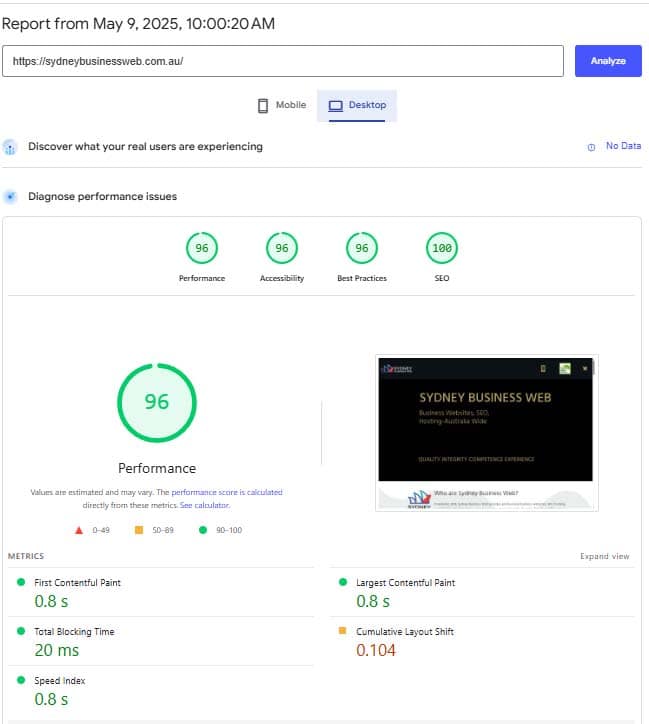
Addendum: Speed Measurement
CONTACT SYDNEY BUSINESS WEB NOW!
get started online NOW with your ONLINE BUSINESS ENGINEERING