
Technical Solution Problem 9: Why Critical Website Emails Fail — and the Engineered Delivery Solution
Welcome to Sydney Business Web Technical Solutions Problem 9: Why Critical Website Emails Fail — and the Engineered Delivery Solution
Every day, we solve problems for eCommerce website owners. We had a think about how we might use this activity to help others, and came up with this idea: Every week or three, we'll take the trickiest problem and publish our solution.
Important! - Some of these solututions involve adding code to your website (WordPress and Woocommerce mostly), so please ALWAYS be careful. We are not in any way responsible, directly or indirectly for any impact or consequences our code or advice has on your website, nor are we liable for any damage arising from such use.
Always back up your website before changing or adding code and/or editing the database, This is critically important!!!
PROBLEM 9: Why Critical Website Emails Fail — and the Engineered Delivery SolutioNS

In our recent technical page on protecting passport and identity documents submitted through websites, we described the secure intake side of the problem: encrypted transmission, controlled handling, private storage, and reduced exposure of highly sensitive customer files.
But that job also exposed a second problem which is often treated far too casually on business websites.
A secure submission workflow is not complete merely because the files arrive safely. It also depends on the right people being notified, promptly and dependably, that the event has occurred. If a critical website-generated email is delayed, junked, rejected, or quietly lost in an unreliable mail path, then part of the system has already failed.
This page is about that failure point.
It is not a general discussion about “improving email deliverability” in the abstract. It is a technical solution page about designing a trustworthy notification path for important website events. In this case, the context was a document-upload workflow involving identity material. That made the email layer more than a convenience. It made it part of the operational and security design.
We had already discussed some common causes of spam-foldering and poor delivery in our earlier post, Is Your Email Going Straight Into SPAM Folders?. Here we take the next step. We move from symptoms to engineering requirements, from ad hoc website mail to a defined transactional delivery path, and from “the form seems to work” to a more professional standard of reliability.
We were not trying to improve email in the abstract. We were designing a reliable notification subsystem for a high-trust website workflow.
Problem: critical website notifications cannot be trusted
Many business websites still rely on ordinary server mail or a loosely configured sending arrangement for important operational messages. That is often tolerated because the visible part of the system appears to work. The user fills in the form, clicks submit, sees a success message, and assumes the job is done.
From an engineering standpoint, that assumption is unsafe.
The visible submission event and the downstream notification event are not the same thing. A form can submit successfully while the notification email is delayed, spam-foldered, rejected by policy, mishandled by the hosting environment, or lost within a weak delivery path. When that happens, the website has not failed cosmetically. It has failed operationally.
This distinction matters most when the submission is not trivial. If the website is collecting quote requests, booking enquiries, order events, support cases, or identity documents, the email path is part of the business process. It is no longer acceptable to treat mail delivery as an incidental feature bolted onto the edge of the site.
That was the real issue in this recent job. The workflow involved sensitive uploaded identity material. We had already engineered the secure handling of the files themselves. But a secure intake path is only half a solution if the corresponding alert to authorised staff cannot be relied upon. At that point, weak email delivery becomes a system-design flaw.
A successful form submission is not the same as a successful business event. The event is only complete when the notification path can be trusted as well.
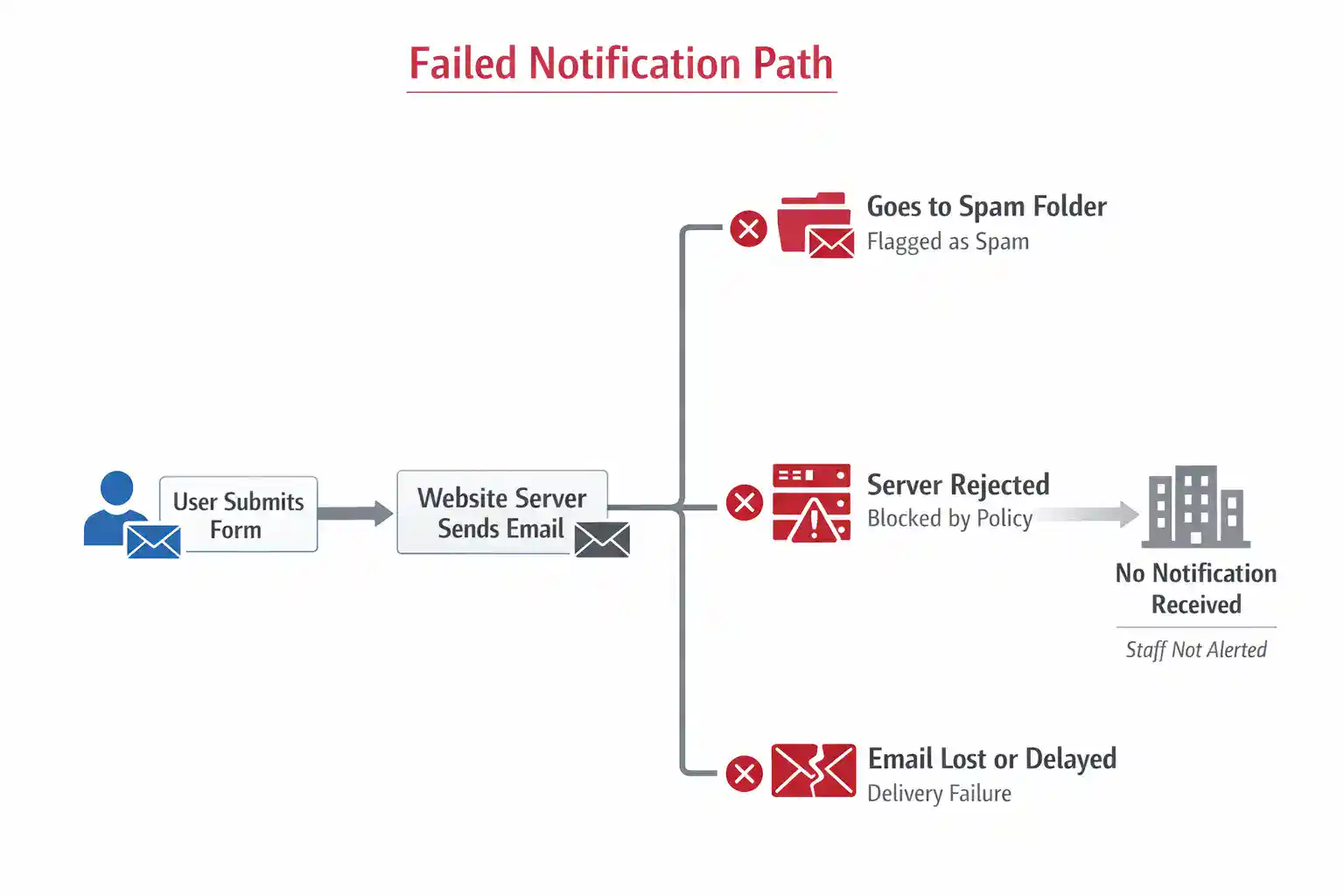
Failure modes in ordinary website email
Once the problem is stated clearly, the next step is to identify where the notification path actually fails. This matters because “email not delivered” is not a single fault. It is a family of failure modes, some technical, some reputational, and some architectural.
The first common failure is weak sender authentication. If the sending domain is not properly aligned through SPF, DKIM and related DNS records, receiving systems are more likely to distrust the message or handle it harshly. In earlier years, poor configuration might still have limped along. That is far less true now.
The second is poor sending reputation or poor sending context. Shared hosting mail can inherit trust problems from outside the website’s own control. Even where the website itself is innocent, the mail path may still be treated as low-confidence by receiving systems. For important notifications, that is an unacceptable dependency.
The third is architectural confusion. Many websites still blur together marketing mail, casual notifications, form alerts, and sensitive operational messages as though they are all the same. They are not. A booking confirmation, a document-upload alert, and a newsletter blast should not be treated as one undifferentiated stream. The more important the event, the more carefully the notification path should be separated and controlled.
The fourth is misuse of email itself. In weak systems, email is treated not just as a notification channel but as the document carrier, the archive, and the fallback storage method all at once. That increases exposure, makes workflows messier, and creates unnecessary risk where sensitive files are involved.
The fifth is lack of verification. Many website owners believe the system works because a test message arrived once. That is not engineering evidence. Intermittent failures, spam-foldering, policy rejection, rate-limiting and silent delivery problems are easily missed when the mail path has not been designed, authenticated and tested as a system.
These failure modes are why an engineer should not ask only, “Can the website send mail?” The more serious question is, “Can this notification path be trusted under real operating conditions?” That is a very different standard.
Email failure is rarely one simple fault. It is usually a chain of weaknesses in authentication, reputation, architecture and verification.
Design requirements for a trusted notification path
Once the failure modes are identified, the solution should not be described vaguely as “better email”. It should be defined as a set of engineering requirements. In this job, the requirement was not merely that the website should send mail. It was that important website-generated notifications should move through a controlled, authenticated and testable delivery path.
The design requirements were as follows:
- Authenticated sending: the sending identity had to be properly verified so that receiving systems could recognise the messages as legitimate and aligned with the domain.
- Transactional-only delivery path: important operational notifications had to be separated from casual or promotional email behaviour and sent through a channel intended for transactional mail.
- Clear sender identity: the “From” address, sending domain and message role had to be deliberate and consistent rather than improvised.
- No sensitive attachments in email: the notification email was to alert staff to an event, not carry identity documents around as ordinary mailbox attachments.
- Private document storage outside the mailbox: the uploaded files had to be transferred into controlled private storage, keeping email out of the role of archive or transport container for sensitive material.
- Reliable WordPress integration: the website had to pass messages into the delivery service through a properly configured integration layer rather than relying on default host mail behaviour.
- Testability and verification: the mail path had to be capable of being tested, validated and reviewed as a defined system rather than assumed to work because a form showed a success message.
- Clean client handover: the finished setup had to be understandable, supportable and transferable to the client at sign-off.
That list is important because it turns a vague complaint about spam into a solvable systems problem. Each requirement exists to answer a known weakness. Weak authentication is answered by verified sending. Poor mail context is answered by a transactional delivery path. Attachment misuse is answered by keeping sensitive files in controlled storage. Hidden fragility is answered by testing and documentation.
At that point, the solution stops being “send emails better” and becomes a designed notification subsystem with defined operating rules.
The engineering move is to replace a vague deliverability problem with explicit system requirements that can be designed, implemented and verified.
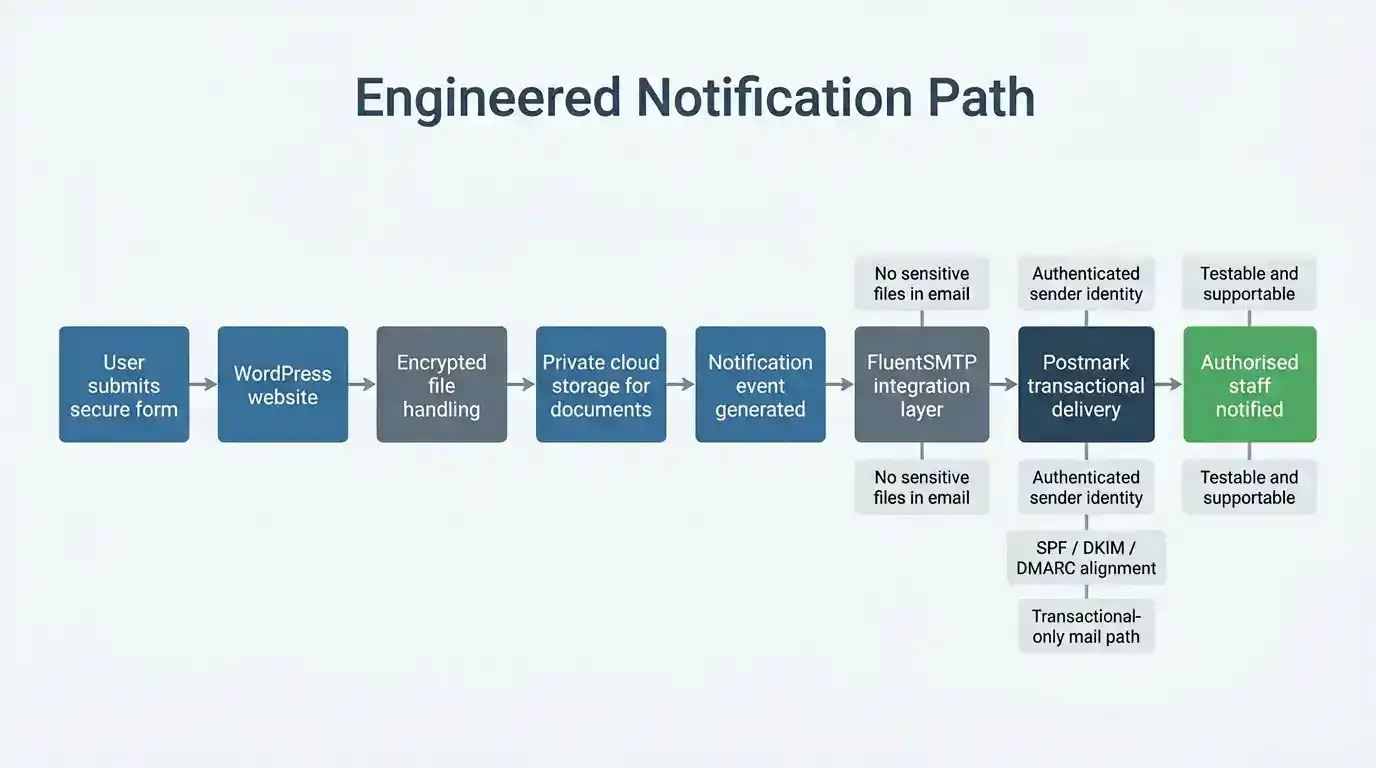
Implemented solution architecture
Once the requirements were clear, the solution followed a defined path. We did not treat email as a casual by-product of the form. We treated it as a separate notification subsystem within a larger secure workflow.
The implemented architecture worked as follows:
- User submits the secure form: the website accepts the form submission over an encrypted connection in the normal way.
- WordPress processes the event: the site receives the submission and hands the uploaded files into the secure handling workflow rather than treating email as the primary carrier.
- Encrypted file handling and private storage: sensitive uploaded documents are transferred into controlled private cloud storage, reducing exposure on the website itself and keeping the files out of ordinary mailbox traffic.
- Notification event is generated: once the submission has been processed, the system creates a notification event for authorised staff.
- FluentSMTP provides the integration layer: rather than relying on default hosting mail, WordPress passes the notification through a properly configured mail integration layer.
- A dedicated transactional delivery service handles outbound mail: the notification is handed off to a service designed specifically for transactional email rather than to generic server mail on shared hosting.
- Authorised staff receive the alert: staff are notified that a submission has occurred, but the sensitive files themselves are not being casually pushed around as email attachments.
This distinction matters. The storage path and the notification path serve different purposes and should be engineered differently. The storage path is concerned with protection, controlled access and reduced exposure. The notification path is concerned with authenticity, deliverability, traceability and operational reliability.
That is why it would be wrong to describe this merely as “setting up SMTP”. SMTP is only part of the transport mechanism. The real solution is the architecture around it: a defined notification event, a controlled integration layer, authenticated sender identity, proper DNS alignment, transactional-only delivery, and separation between sensitive files and routine email traffic.
In practical terms, that gave the client a far stronger result than ordinary website mail. The form workflow remained usable, the documents were handled more safely, and the business notifications moved through a delivery path designed for dependable transactional messaging rather than shared-hosting guesswork.
In this particular project, the transactional delivery service selected for that role was Postmark. The reason for that choice is explained next.
The key engineering decision was to separate secure document handling from dependable notification delivery, then design each path for its own purpose.
Why ordinary website mail was rejected for this job
Once the workflow was defined properly, ordinary website mail was no longer an acceptable design choice. That is not because it never works. It is because it does not provide a strong enough operating standard for a high-trust notification path.
In this job, we rejected the ordinary approach for several reasons:
- It is too dependent on the hosting environment: default website mail often relies on the server’s own mail behaviour, shared infrastructure, or a loosely controlled sending context. That is a poor foundation for important operational alerts.
- It can be weakly authenticated or inconsistently aligned: even where mail is technically sent, the sending identity may not be strong enough in SPF, DKIM, DMARC or related DNS terms to inspire confidence at the receiving end.
- It blurs low-value and high-value messages together: ordinary website mail does not naturally distinguish between trivial form alerts and business-critical notifications. In engineering terms, it lacks proper separation of concerns.
- It is difficult to regard as a controlled subsystem: for important events, we want the notification path to be intentional, testable and supportable. Generic hosting mail is too often just “whatever the server does”.
- It encourages poor design habits: once a website relies on casual mail behaviour, it becomes too easy to let email do too much — including carrying information that ought to remain in controlled storage instead.
There is also a practical distinction worth stating clearly. SMTP is the standard protocol used to transfer email between systems. It is part of how email moves. But “using SMTP” does not in itself answer the engineering question. A weak mail path can still use SMTP. A poorly trusted server can still use SMTP. A badly designed website workflow can still use SMTP.
So the real question was never, “Can the site send mail over SMTP?” The real question was, “Can this notification path be trusted as part of a professional workflow involving sensitive customer material?” Once stated that way, the ordinary website mail approach fell below the required standard.
That is why we moved away from default or generic sending and towards a dedicated transactional delivery path with proper authentication, clearer identity, better separation, and more defensible operational behaviour.
SMTP is only the transport protocol. The real engineering issue is whether the whole notification path is trustworthy, controlled and fit for purpose.
Why Postmark was selected
Once ordinary website mail had been rejected, the next step was to choose a delivery service that matched the engineering requirements of the job. In this case, Postmark was selected because it suited the notification role far better than a generic mail path.
The selection was based on the following factors:
- It is built specifically for transactional email: Postmark is designed for important system-generated messages such as notifications, confirmations and alerts, not for general-purpose bulk marketing traffic.
- It supports properly authenticated sending: the service allows the sender identity and domain to be configured in a deliberate, verifiable way, rather than leaving trust to chance.
- It fits a controlled WordPress integration model: connected through FluentSMTP, it provided a clean handoff from the website into a dedicated outbound mail service.
- It reinforces separation of roles: the website handles the form event, the storage layer handles the documents, and the transactional mail service handles the notification. Each part does its own job.
- It is easier to test, support and hand over: from an operational standpoint, it gives a clearer and more maintainable setup than relying on whatever the hosting server happens to do.
That last point matters more than many businesses realise. A good technical solution should not only work today. It should also be understandable later, supportable under pressure, and capable of being handed over cleanly to the client at sign-off. Postmark helped us achieve that.
It is also worth stating what Postmark was not being used for. It was not being used as a document store, a substitute workflow engine, or a magic cure for every email problem. Its role was much more precise: to provide a stronger outbound delivery path for important website-generated notifications within a larger secure workflow.
That precision is exactly why it was the right choice. We were not looking for “an email tool”. We were looking for a dependable transactional delivery component inside a high-trust website system.
Postmark was selected not as a marketing extra, but as a defined delivery component in a system that needed authenticated, supportable and transactional-only notification behaviour.
Implementation, verification and handover
A solution like this is only respectable if it can be implemented cleanly, tested properly and handed over without mystery. That was part of the engineering standard applied here.
The implementation work included the following:
- Configuring the sender identity: the sending address and domain relationship were set up deliberately rather than left as a vague default.
- Connecting WordPress through FluentSMTP: the website was linked into the transactional delivery path through a defined integration layer rather than relying on ordinary hosting mail.
- Separating notification from file carriage: the email was used to notify authorised staff that an event had occurred, while the sensitive uploaded material remained in controlled storage.
- Checking the end-to-end event path: the important question was not merely whether an email could be sent, but whether a real submission resulted in the right operational outcome.
- Confirming maintainability: the completed setup was kept understandable and supportable so that it could be documented and handed over properly at sign-off.
That verification step is important. Too many website mail arrangements are accepted after a single casual test, which proves very little. What matters in a business workflow is whether the whole chain behaves predictably: submission, file handling, notification generation, outbound delivery, and receipt by the people who must act on it.
From an engineering perspective, the outcome was not just “email now works better”. The outcome was a cleaner and more defensible subsystem. The website accepted the submission, the sensitive documents were handled through the safer storage path, and the business notification moved through a more controlled transactional delivery mechanism.
Just as importantly, the client was not left with a black box. The solution could be explained, supported and transferred. That matters in any professional system, but especially in workflows involving sensitive customer information.
A technical solution is not complete when it merely functions. It is complete when it can be verified, supported and handed over without guesswork.
Published delivery figures and what they really mean
One reason this subject confuses businesses is that “delivery rate” and “inbox placement” are not the same thing. A provider may report a strong delivery rate while some messages still land in spam or junk. So the figures below should be read as published delivery-performance indicators, not as a promise that every message reaches the primary inbox.
| Service / approach | Published figure | What that suggests |
|---|---|---|
| Postmark | 99% delivery rate | Strong published performance for transactional mail, with a public emphasis on delivery transparency and time-to-inbox. |
| Mailgun Deliverability Services | 97.4% average delivery rate | A strong published figure, though specifically stated as an average for deliverability-services customers rather than a universal platform-wide number. |
| Brevo | 99% delivery rate | A strong vendor-published figure, though the platform is broader in scope and not framed as narrowly around transactional-only workflows as Postmark. |
For us, the practical lesson is not that one published percentage magically solves the whole problem. It is that serious providers expose deliverability as something measurable, monitored and engineered. That is already a very different standard from ordinary website mail running quietly in the background on shared hosting.
The important difference is not just a number on a marketing page. It is whether email delivery is being treated as a monitored system or as an unexamined side effect of the website.
Conclusion: critical website email is now an engineering problem
Five or ten years ago, many businesses could get away with casual website email. That is becoming much harder. Modern mailbox providers expect authenticated sending, coherent sender identity, low complaint rates, and behaviour that looks like a legitimate system rather than improvised mail from a random website.
That is why we do not treat critical website email as a minor plugin setting or a box to tick in WordPress. If a site is handling quote requests, bookings, order notices, support workflows or sensitive document submissions, then the notification path deserves to be designed properly. It is part of the operating system of the business.
In this job, that meant separating roles clearly. The website handled the form event. The secure storage path handled the uploaded identity documents. The notification path handled the alert to authorised staff. And the outbound delivery path was moved away from ordinary host mail into a defined transactional service with a stronger authentication and support model.
Could other transactional providers have been used? Yes, in some cases. The broader engineering principle is more important than brand loyalty: use a dedicated transactional delivery path, authenticate it properly, keep sensitive files out of routine email, and make the whole thing testable and supportable. In this particular implementation, Postmark was the component chosen because it fitted that model cleanly and professionally.
That is the real lesson here. The problem was never just that emails might go to spam. The problem was that a high-trust website workflow was being asked to depend on a weak notification path. The solution was to engineer that path properly.
When important website emails matter to operations, compliance or customer trust, they stop being a convenience feature and become part of the system design.
Frequently Asked Questions
Why do critical website emails fail even when the form appears to work?
Because the visible form submission and the downstream notification path are two different events. A user may see a success message while the email is delayed, filtered, rejected or lost in a weak delivery path.
Is this really an engineering problem rather than just an email issue?
Yes. Once a website is handling quote requests, bookings, support workflows or sensitive document submissions, dependable notification becomes part of the operational system design, not just a convenience feature.
What is wrong with ordinary website mail on shared hosting?
It may work sometimes, but it is often too dependent on generic server behaviour, weak authentication, mixed sender reputation and poor separation between trivial and business-critical messages.
Why not just say the solution is SMTP?
Because SMTP is only the transport protocol. It does not by itself solve weak sender identity, poor authentication, shared-hosting reputation, bad workflow design or the lack of a controlled transactional delivery path.
Why keep sensitive uploaded documents out of the email itself?
Because email is a notification channel, not the best place to move, store and expose highly sensitive files. In a stronger design, the documents are handled through controlled storage while email simply alerts authorised staff that an event has occurred.
Why was Postmark chosen for this solution?
Because it suited the role of a dedicated transactional delivery component. It gave the website a cleaner outbound path for important notifications and fitted well with the requirement for authenticated, supportable and professional message delivery.
What role does FluentSMTP play in the setup?
FluentSMTP acts as the WordPress integration layer. It allows the website to hand notification mail into the defined delivery path rather than relying on the host server’s default mail behaviour.
Can this kind of solution be added to an existing WordPress website?
In many cases, yes. A site does not always need to be rebuilt from scratch to gain a more dependable notification path, provided the domain, form workflow and sending identity can be configured properly.
Does a transactional email service guarantee inbox placement every time?
No honest provider should promise that. But a properly engineered transactional setup is a much stronger and more defensible baseline than casual default website mail.
What is the real outcome of this kind of engineering work?
The outcome is not merely that “emails work better”. The real outcome is that a critical website workflow becomes more reliable, more supportable and more trustworthy under real business conditions.
External References
| Source | Why it is useful |
|---|---|
| Google Email Sender Guidelines | Explains the current authentication and sender requirements that now shape whether important email is trusted, filtered or rejected. |
| Yahoo Sender Best Practices | Useful as confirmation that stricter authentication and sender-discipline requirements are not just a Google issue. |
| Postmark: What Is Email Deliverability? | Helpful for the distinction between delivery, deliverability and time-to-inbox, and for Postmark’s own published delivery-performance discussion. |
| FluentSMTP: Configure Postmark | A practical reference showing how a WordPress site connects its outbound email path to Postmark through FluentSMTP. |
| Postmark | The transactional email service used in this implementation, relevant for readers who want to see the product itself. |
Internal Sydney Business Web Links
| Page | Why it is useful |
|---|---|
| How We Protect Passport and Identity Documents Submitted Through Websites | This is the closely related technical solution page that explains the secure intake and storage side of the same client workflow. |
| Is Your Email Going Straight Into SPAM Folders? | Our earlier background piece on why business email goes missing, lands in spam, or fails trust checks. |
| Sydney Business Web Blog Archive | Useful for readers who want to explore the wider technical and business-engineering content published by Sydney Business Web. |
| Sydney Business Web FAQ | A good general reference for readers who want broader information about how we work, support sites and handle technical projects. |
Need help? -
CONTACT SYDNEY BUSINESS WEB NOW!