
Technical Solution Problem 8: How We Protect Passport and Identity Documents Submitted Through Websites
Welcome to Sydney Business Web Technical Solutions Problem 8 - How We Protect Passport and Identity Documents Submitted Through Websites
Every day, we solve problems for eCommerce website owners. We had a think about how we might use this activity to help others, and came up with this idea: Every week or three, we'll take the trickiest problem and publish our solution.
Important! - Some of these solututions involve adding code to your website (WordPress and Woocommerce mostly), so please ALWAYS be careful. We are not in any way responsible, directly or indirectly for any impact or consequences our code or advice has on your website, nor are we liable for any damage arising from such use.
Always back up your website before changing or adding code and/or editing the database, This is critically important!!!
PROBLEM 8: How We Protect Passport and Identity Documents Submitted Through Websites
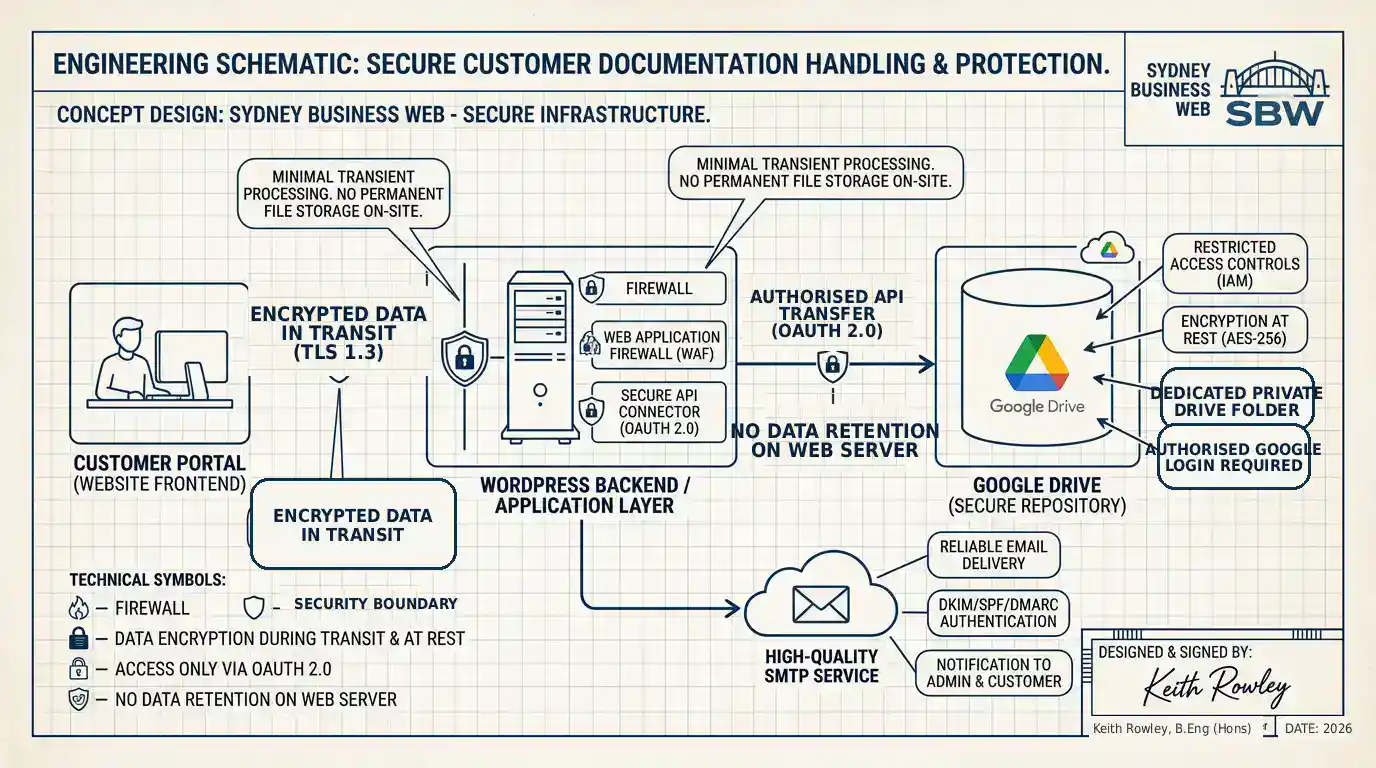
When a customer is asked to upload a passport, identity document, or other sensitive personal record through a website, the stakes rise immediately. This is no longer just a convenient form submission. It is a trust decision. If that data is handled casually, stored unnecessarily on the web server, or pushed through weak email delivery, the business is taking risks it may not even fully understand.
We take a harder line than that. Our view is simple: if a website is collecting highly sensitive customer documentation, the workflow must be designed around security, controlled access, minimal retention, and reliable delivery from the outset. It is not enough to bolt on a file upload field and hope for the best.
That is why we built a workflow that accepts the documents through the website, transfers them to private cloud storage, removes the local website copy after transfer, and uses properly configured transactional email for dependable notifications. The aim is straightforward: collect what is needed, protect it properly, and avoid turning the website itself into a document dump.
My own engineering background includes earlier work in military electronic security communications, and although that was in another professional chapter of life, one principle has never left me: sensitive information should move through a system with deliberate controls, not with wishful thinking. That same mindset still guides how we design high-trust website workflows today.
Why ordinary website file uploads are not good enough
Many websites allow file uploads perfectly well at a technical level, but that does not mean they are handling sensitive customer documents well from a security point of view. In a basic setup, uploaded files may sit on the hosting account, remain accessible for longer than intended, inherit weak or unclear permissions, or be left tied too closely to the web application itself. That may be acceptable for a brochure PDF or a harmless image. It is not a good standard for passport pages, identification records, or other personal documentation.
The problem is not simply whether a form works. The problem is what happens after the upload. Where is the file stored? Who can access it? How long does it remain on the server? How are authorised staff meant to retrieve it? What happens if email delivery fails and a time-sensitive submission is missed? These are the questions that separate a casual upload form from a properly engineered document-handling workflow.
For this reason, we do not treat the website as the final resting place for highly sensitive uploaded documents. We use it as a controlled intake point only. The document is received, processed briefly, transferred into a more appropriate private repository, and then removed from local website storage. That approach reduces unnecessary exposure on the web server and gives the business a cleaner, more defensible handling model.
Just as importantly, access to the stored files should not depend on somebody finding an old attachment in an inbox or poking around in a hosting account. Access should be deliberate, permission-based, and limited to authorised people. That is one of the main reasons we connect this type of workflow to private Google Drive storage rather than leaving files sitting on the website itself.
How the secure document workflow actually works
In this type of setup, the website still plays an important role, but only as the controlled front-end entry point. The customer completes the booking or application form, attaches the required documents, and submits them through an encrypted website connection. The key point is that the website is used for intake, not as a casual long-term storage location for highly sensitive files.
Once the form is submitted, the uploaded files are handled only briefly within the WordPress application layer. From there, they are transferred into a dedicated private Google Drive location that has been set aside specifically for this workflow. After successful transfer, the local website copy is automatically deleted. That means the files do not remain sitting unnecessarily on the hosting account, where they would otherwise increase exposure and create an avoidable security concern.
This is an important distinction. Many businesses assume that a file upload field is the solution. It is not. The upload field is only the entry point. The real solution is the architecture behind it: encrypted submission, controlled transfer, private off-site storage, restricted access, and minimal local retention.
In the workflow we designed, the website receives the document, passes it on, and then gets out of the way. That is exactly how it should be when sensitive personal information is involved. The less time those files spend resting on the public-facing web server, the better.
At the same time, the system still needs to remain practical for the business. Staff must be able to receive submission alerts, follow up quickly, and access the uploaded documents when authorised to do so. That is why the workflow combines secure file transfer with reliable notification delivery, rather than treating storage and communication as separate problems.
Why we connect sensitive uploads to private Google Drive storage
We use private Google Drive storage because it gives the business a more appropriate place to hold sensitive customer documents than the web server itself. In other words, the website collects the files, but the private cloud repository becomes the controlled destination. That allows access to be managed through authorised Google accounts rather than through ad hoc file handling on a hosting account.
The important point here is not that Google Drive is somehow magical. The important point is that it provides a private storage environment with structured access control, account-based authentication, and a separation between the public website and the stored customer documents. That separation matters. It means the business is no longer relying on the website alone to act as both intake point and document repository.
In this implementation, the target folder is dedicated to the workflow. Uploaded files are sent to that location only. Access to those files still requires appropriate Google authentication, and visibility is set to private rather than openly shared. That is where the real protection sits: in controlled access and restricted visibility, not in gimmicks or appearances.
Some plugins offer options such as “encrypted” or obscured filenames, and while these can add uniqueness or make filenames look less tidy, they should not be mistaken for the primary security mechanism. A long machine-generated prefix may reduce casual readability, but it does not replace proper private storage and permission control. Real security comes from who can get into the repository in the first place, not from pretending a filename has been meaningfully hidden.
This is one of the reasons we prefer to speak plainly about these systems. Businesses trusting a website with passport data or identity documents deserve honest engineering, not decorative security language. Restricted access, private storage, and reduced server retention are meaningful controls. Cosmetic filename obscurity is, at best, only a minor extra.
Why OAuth and Google project setup matter in a high-trust workflow
When a website connects to private Google Drive storage properly, it should not do so by storing somebody’s Google password inside WordPress or by relying on a crude workaround. The safer approach is to use Google’s authorised access framework, which means creating a Google Cloud project, enabling the required API services, and authenticating the connection through OAuth. That process can feel technical, but it exists for a good reason: it creates a controlled, revocable, permission-based relationship between the website and the private storage repository.
In practical terms, OAuth allows the website to request the access it needs without exposing the underlying Google account credentials to the website administrator, plugin settings screen, or hosting environment. The site is granted a defined level of access through a token-based process rather than through casual credential sharing. That is a much better model when sensitive customer documents are involved.
There is also an important governance point here. Setting up the Google side properly means defining the project, configuring the consent screen, enabling the relevant API, supplying the authorised redirect details, and completing the connection in a way that Google will recognise and manage. This is not just paperwork. It is part of the trust chain. It makes the integration more structured, more traceable, and easier to hand over cleanly to the client later.
Another advantage is control. If access ever needs to be changed, revoked, moved to a new owner, or reviewed during handover, that can be done through the authorised Google environment rather than by trying to untangle hidden credentials and brittle shortcuts. In a business workflow handling identity documents, that matters a great deal. Clean revocation and controlled permission management are not luxuries. They are part of responsible system design.
We regard this stage as one of the quiet strengths of the whole solution. It is easy for a casual implementer to focus on getting the plugin to “work”. It is better engineering to ask whether the connection has been established in a way that can be justified, maintained, and handed over without embarrassment later.
Encryption, access control and what actually protects the documents
Businesses sometimes hear phrases such as encrypted upload, encrypted filename, or secure storage and assume the whole question of protection has somehow been solved. It has not. What matters is understanding which protections are genuinely doing the heavy lifting and which are merely secondary details.
At the website level, the first protection is encrypted transmission. The form should be submitted over HTTPS so that data is protected while travelling between the customer’s browser and the website. That matters, but it is only the beginning. Once the files reach the application layer, the next question is where they go, how long they remain there, and who is able to access them afterwards.
That is why controlled repository access matters so much. In the workflow described here, the stronger protection comes from moving the uploaded files into a private Google Drive location with authorised account-based access, then deleting the local website copy after transfer. That reduces exposure on the server and shifts access control into a private environment where permissions can be managed deliberately.
It is also worth being candid about filenames and cosmetic “encryption” features offered by some plugins. A generated prefix may add uniqueness and may reduce the neat visibility of the original filename, but it is not the main protective barrier. The real barrier is that the file sits in private storage behind authorised access, not in the fact that its name looks untidy or machine-generated.
So what actually protects the documents? Encrypted transit helps. Private cloud storage helps. Authorised access controls help. Minimal retention on the web server helps. A properly designed handoff process helps. These are meaningful controls. By contrast, anything that merely makes the file look obscure without materially restricting access should be treated as a minor extra, not the centrepiece of the security story.
Why reliable email delivery is part of document security too
When a customer submits sensitive documents through a website, file storage is only part of the job. The business also needs dependable notification that the submission has occurred. If an important form arrives but the alert email is delayed, rejected, or lost in spam because the website is relying on default WordPress mail, the workflow is already weaker than it should be.
That is why we treat deliverability as part of the protection model, not as a separate afterthought. In this implementation, the form notifications were routed through a proper transactional email service using FluentSMTP and Postmark rather than being left to the hosting server’s basic mail behaviour. The reason is straightforward: important submissions deserve authenticated, professional email delivery with a far better chance of reaching the intended mailbox cleanly and promptly.
This does not mean sensitive documents should be emailed around as attachments indiscriminately. Quite the opposite. The safer model is that the website sends notification of the submission and provides the authorised path to the stored files, while actual document access remains governed by the private repository and its login controls. In other words, email should support the workflow, not become the document store.
That distinction matters. Businesses sometimes confuse communication with storage. They are different things. SMTP and transactional mail help ensure that staff know a submission has arrived. Private controlled storage helps ensure the uploaded documents are not simply bouncing around inboxes in an unmanaged way. Together, those two layers create a workflow that is both practical and far more defensible.
There is a separate technical story to tell about why we use SMTP, domain authentication, and services such as Postmark for critical website notifications. That deserves its own deeper treatment. For present purposes, the key point is simple: a sensitive document workflow is incomplete if the alerting mechanism is unreliable.
Why ownership and handover matter in a secure document workflow
There is another part of this that is often overlooked: ownership. A business may have a secure workflow built for it, but if the key systems remain tied to a developer’s personal accounts or improvised access arrangements, the architecture is not really finished. High-trust workflows should be designed not only to work securely today, but also to be handed over cleanly and controlled properly by the client at sign-off.
That is why we prefer a client-owned model for the important moving parts. If Google Drive is being used for private document storage, the account and folder structure should be capable of belonging fully to the client. If transactional email is being used for form notifications, the sending service should also be capable of being transferred cleanly into the client’s control. Developer access can then be granted during setup and support, and removed later if required.
This matters for security as much as convenience. Clear ownership reduces confusion over who controls the stored files, who can revoke access, who receives alerts, and who is ultimately responsible for the workflow. It also avoids the ugly situation in which sensitive customer data sits inside a system that nobody properly owns or fully understands once the original implementer steps away.
Good engineering should leave behind a system that the client can govern with confidence. In practical terms, that means the architecture should be secure, supportable, comprehensible, and handover-ready. Sensitive document workflows should not depend on hidden dependencies, mystery accounts, or vague assumptions about who still has access.
What this means for businesses collecting sensitive customer documents
If a business is asking customers to upload passports, identity records, licences, or other personal documents through its website, it is taking on a serious responsibility. Customers will usually assume that the business has thought this through. They will not picture the details of the workflow, but they will assume that one exists and that it has been designed with care. That assumption should be respected.
For travel businesses, specialist service firms, migration-related services, some professional consultancies, and any operation that needs identity evidence from customers, this is not a theoretical issue. It is a practical operational question with trust implications. The moment a form invites someone to upload highly sensitive documents, the business has crossed into a higher-duty category of website handling. It should behave accordingly.
That does not necessarily mean building an enormous or bureaucratic platform. It means making intelligent architectural choices. Use the website as a secure intake point. Move the files into private controlled storage. minimise unnecessary retention on the server. make access deliberate and permission-based. ensure alerts are delivered reliably. build the connection through proper authorised methods. leave the client with clear ownership. Those are not grand gestures. They are simply the basics of responsible implementation.
We take this approach because it is both technically sound and commercially honest. It protects the customer better, gives the business a cleaner operating model, and avoids the false comfort of superficial “security” features that do not really address the core exposure. Sensitive document handling deserves better than that.
Our view
We do not believe in treating sensitive document uploads as just another WordPress form feature. If the documents matter, the handling model matters. The website must do more than accept the submission. It must form part of a controlled chain that protects the customer, limits unnecessary exposure, and leaves the business with a workflow it can defend with a straight face.
That is why our preferred model is simple and disciplined: encrypted intake through the website, rapid transfer into private cloud storage, automatic deletion of the local server copy, restricted access through authorised accounts, reliable notification delivery, and clean client ownership at sign-off. It is not flashy. It is just a better way to handle a sensitive job.
If your business needs customers to upload passports, identity documents, or other confidential records through your website, this is the standard of thinking we recommend. Not decorative reassurance. Not plugin-box complacency. Real controls, carefully chosen, with each part of the workflow doing a clear job.
Frequently Asked Questions
Is it safe to ask customers to upload passport or identity documents through a website?
It can be done more safely, but only if the workflow is designed properly. A basic file upload field on its own is not enough. Sensitive documents should be transmitted over HTTPS, moved promptly into private controlled storage, removed from the web server where possible, and made accessible only to authorised people.
Why should uploaded documents not remain on the web server?
The web server is the public-facing part of the system. Even when it is well managed, it is not the ideal long-term resting place for highly sensitive customer files. Keeping passport and identity documents there longer than necessary increases exposure and creates a weaker handling model than a private off-site repository with controlled access.
Why use private Google Drive storage for this kind of workflow?
Private Google Drive storage gives the business a separate, controlled repository for sensitive files rather than leaving them sitting inside the website environment. Access can be restricted to authorised Google accounts, visibility can be kept private, and the website no longer has to serve as both collection point and document store.
Does an encrypted or obscured filename make the uploaded file secure?
Not in any meaningful primary sense. A long machine-generated prefix may add uniqueness and a little obscurity, but it is not the main protection. Real security comes from private storage, authorised access control, encrypted transmission, and avoiding unnecessary retention on the web server.
Why is OAuth part of the setup?
OAuth allows the website to connect to Google Drive through an authorised, token-based process rather than by storing a Google password inside WordPress. That makes the integration more controlled, more revocable, and more professional. It is an important part of the access-control chain in a high-trust workflow.
Why does SMTP matter if the main issue is document security?
Because a secure workflow is incomplete if the business cannot rely on the submission alert being delivered. Proper SMTP and transactional mail services improve authentication, deliverability, and consistency. The documents themselves should remain in controlled storage, but the notification process also needs to be dependable.
Are the uploaded documents sent around as normal email attachments?
That is not the preferred model. A better approach is for the form workflow to notify authorised staff that a submission has arrived while access to the actual files remains governed by the private storage system and its login controls. Email should support the workflow, not become the document repository.
Who owns the Google Drive and email systems after setup?
Our preference is a client-owned model. The important accounts and storage locations should be capable of being fully handed over to the client at sign-off, with developer access removable if needed. That creates a cleaner, more secure, and more defensible long-term arrangement.
External References
| Source | Why it matters |
|---|---|
| Google Drive API Overview | Useful for understanding how Google Drive integrations work and why private cloud storage can be connected in a structured, supported way. |
| Google OAuth Consent Screen Guide | Explains the consent-screen setup that forms part of a proper OAuth connection when a website is authorised to access private Google services. |
| Google OAuth 2.0 for Web Server Applications | Helpful background on token-based authorised access for server-side applications, including redirect URIs, scopes, access tokens, and revocation. |
| Postmark: Managing Sender Signatures | Shows why verified sending domains, DKIM, and Return-Path matter when setting up a professional transactional email service. |
| Postmark: Custom Return-Path | Useful for understanding how bounce handling and Return-Path configuration support cleaner authenticated delivery. |
| FluentSMTP Documentation | Useful for showing how WordPress form notifications can be routed through a proper mail delivery layer instead of relying on default server mail. |
Internal Sydney Business Web Links
| Page | Why it is relevant |
|---|---|
| Business Websites, Ecommerce and SEO Blog | Connects this page to the wider Sydney Business Web knowledge base and helps readers explore more of our engineering-led technical and business website content. |
Need help? -
CONTACT SYDNEY BUSINESS WEB NOW!