
Technical Solution Problem 13: Agentic Browsing Readiness Errors on Pagespeed
Welcome to Sydney Business Web Technical Solutions Problem 13: Agentic Browsing Errors on Google Pagespeed
Every day, we solve problems for eCommerce website owners. We had a think about how we might use this activity to help others, and came up with this idea: Every week or three, we'll take the trickiest problem and publish our solution.
Important! - Some of these solututions involve adding code to your website (WordPress and Woocommerce mostly), so please ALWAYS be careful. We are not in any way responsible, directly or indirectly for any impact or consequences our code or advice has on your website, nor are we liable for any damage arising from such use.
Always back up your website before changing or adding code and/or editing the database, This is critically important!!!
Technical Solution Problem 13: Agentic Browsing readiness

When a Website Looks Right to Humans, But Confuses AI Agents
One of the newest technical challenges for business websites is not whether the page looks good to a human visitor. It is whether the page can also be understood by browsers, search systems, accessibility tools and AI agents.
That is the issue behind agentic browsing readiness. A website may look polished on screen, load correctly, display the right headings, show the right buttons, and still contain structural problems that make it harder for machine systems to understand what the page is, what its links mean, and how a user or agent should interact with it.
This technical solution came from a live audit of the Sydney Business Web website itself. Visually, the site looked correct. The header worked. The service icons worked. The mobile menu opened. The phone number displayed. The sitemap, schema and content were already strong. But Lighthouse’s newer Agentic Browsing checks exposed a different layer of problems: machine-readable issues that were almost invisible during normal human browsing.
The faults were not dramatic design failures. They were technical interpretation failures. Empty visual-builder links had destinations but no accessible names. A mobile hamburger menu was clickable but not properly labelled for the accessibility tree. An old preload instruction was still telling the browser to prioritise an image that was no longer urgent. A marginal cumulative layout shift appeared in some Lighthouse tests even though it was not visually obvious during normal use.
To a business owner, these issues may seem abstract. But for a serious business website, they matter. AI-assisted browsers and search systems do not see a page in the same way a human does. They inspect the structure underneath the design: links, labels, layout stability, crawler guidance, machine-readable files, accessibility data and page semantics.
A website is not fully ready for AI agents just because it looks correct. It also needs to be readable, stable and meaningful in the machine layer beneath the design.
What We Found During a Real Agentic Browsing Audit
This was not a theoretical exercise. The audit began because Chrome Lighthouse reported a weak Agentic Browsing result on the Sydney Business Web website. At first glance, that seemed surprising. The site already had strong technical SEO foundations, custom schema, a sitemap, carefully managed crawler access, fast cached delivery, and substantial business content.
But Agentic Browsing exposed a different class of issue. It was not asking whether the page looked attractive. It was asking whether the browser could reliably understand and interact with the page as a structured machine-readable document.
The first failure came from an apparently harmless phone link. Visually, the phone number appeared correctly in the header and footer. But Lighthouse identified an empty telephone link in the page structure:
<a href="tel:0427847653"></a>
To a human visitor, nothing looked wrong. The number was visible nearby. But structurally, the clickable telephone link had no text, no accessible name and no meaningful label. The browser could see a link, but could not tell what the link was for.
The same pattern appeared again with service icon links. The icons and captions looked fine on the page, but the actual clickable wrapper links were empty. They pointed to important service pages such as custom WordPress development, hosting and VPS performance optimisation, and ecommerce web design services, but the anchor elements themselves did not contain meaningful text.
That distinction matters. A visual builder can make an icon, column or card appear to be a labelled link, while the underlying HTML still exposes an empty clickable element to accessibility tools, Lighthouse and automated browsing systems.
The mobile version revealed another example. The hamburger menu opened normally when tapped, but the menu trigger itself had no clear accessible name. A human saw the menu icon and understood it. A machine-readable audit saw a link-like control with no proper label.
We also found an old image preload that was no longer useful. The site was still telling the browser to preload an old award badge image with high priority, even though that image was not needed immediately for the first screen. That was not a visible design problem. It was a resource-priority problem left behind after earlier page changes.
The most stubborn issue was cumulative layout shift on desktop. The page did not appear to jump badly during normal use, and other testing tools did not consistently report a problem. But Lighthouse intermittently detected layout movement. We tested likely causes one by one: the floating support button, the background video, animation effects, font swap, hero section height and Thrive section recalculation. Some suspects looked convincing, but controlled tests ruled them out.
That experience is important. Technical diagnosis is not the same as guessing. A likely explanation is only useful if the test result supports it. In this case, several plausible causes were eliminated before the remaining layout shift was treated as a marginal Lighthouse-sensitive issue rather than a visible user-facing fault.
Agentic browsing readiness is not about chasing green scores. It is about proving that the page is understandable, labelled, stable and technically legible beneath the visual design.
How We Diagnosed the Machine-Readable Faults
The investigation was carried out using Chrome Lighthouse, PageSpeed Insights, Chrome Developer Tools, browser console tests, source-code inspection, anonymous browsing, cache isolation and controlled change testing. The aim was not to assume the cause, but to prove what the browser and Lighthouse were actually seeing.
The first step was to compare what the website looked like visually with what the browser exposed in the Document Object Model. This distinction matters. A link can look correct on screen while still being structurally empty in the HTML. A button can appear beside readable text while the actual clickable element has no accessible name.
Chrome Developer Tools was used to inspect the live page as a normal logged-out visitor. This was important because logged-in WordPress views can include admin-bar elements, editor scripts and non-public markup that ordinary visitors and Lighthouse do not see.
To find empty or unnamed links, we used browser-console queries against the live DOM. One useful diagnostic test was:
[...document.querySelectorAll('a[href]')].map((a, i) => {
  const text = (a.textContent || '').trim();
  const aria = a.getAttribute('aria-label') || '';
  const title = a.getAttribute('title') || '';
  const imgAlt = [...a.querySelectorAll('img')].map(img => img.alt || '').join(' ').trim();
  const r = a.getBoundingClientRect();

  return {
    index: i,
    href: a.getAttribute('href'),
    text,
    aria,
    title,
    imgAlt,
    width: Math.round(r.width),
    height: Math.round(r.height),
    display: getComputedStyle(a).display,
    visibility: getComputedStyle(a).visibility
  };
}).filter(row =>
  ![row.text, row.aria, row.title, row.imgAlt].join(' ').trim() &&
  row.display !== 'none' &&
  row.visibility !== 'hidden' &&
  row.width > 0 &&
  row.height > 0
)
That test returned the visible links that had no useful text, no aria-label, no title and no image alt text. In other words, it helped identify links that a human might understand from the surrounding design, but that the browser accessibility tree could not name clearly.
We also used targeted console checks for specific problem links. For example, old hidden telephone wrapper links were isolated with:
document.querySelectorAll('a[href="tel:0427847653"]').lengthThat confirmed that old empty telephone anchors still existed in the page, even after the visible phone number had been corrected. The visible phone number was not the problem. The problem was an empty visual-builder wrapper link still present in the markup.
To locate invisible clickable areas visually, we temporarily highlighted the suspected links from the console:
document.querySelectorAll('a[href="tel:0427847653"]').forEach(function(a){
  a.style.outline = '5px solid red';
  a.style.display = 'inline-block';
  a.style.minWidth = '40px';
  a.style.minHeight = '40px';
  a.style.background = 'rgba(255,0,0,0.25)';
});
This made invisible structural links appear as red boxes on the live page. It immediately proved that the browser was seeing clickable elements that were not obvious from the normal visual design.
The same method was used for service-card and icon links. Once the empty links were identified, the fix was to give them meaningful accessible names, such as Custom WordPress plugin development, Green hosting and VPS performance optimisation, and Ecommerce web design services. The label described the destination or action, not merely the decorative icon.
The mobile menu was tested separately because Lighthouse mobile reported a nameless menu trigger. The live mobile DOM was inspected with:
console.table([...document.querySelectorAll('a.tve-m-trigger, a[href="#trigger"]')].map(a => ({
  text: a.textContent.trim(),
  aria: a.getAttribute('aria-label'),
  title: a.getAttribute('title'),
  href: a.getAttribute('href'),
  class: a.className
})));
That confirmed whether the hamburger menu trigger had a meaningful accessible label. Once the label appeared correctly in the live anonymous browser test, Lighthouse mobile passed the Agentic Browsing link-name check.
For cumulative layout shift, we used Chrome’s Layout Shift API through the PerformanceObserver interface. This allowed us to ask the browser which elements were involved in layout movement:
new PerformanceObserver((list) => {
  for (const entry of list.getEntries()) {
    if (entry.hadRecentInput) continue;

    for (const source of entry.sources || []) {
      console.log({
        shiftValue: entry.value,
        node: source.node,
        previousRect: source.previousRect,
        currentRect: source.currentRect
      });
    }
  }
}).observe({ type: 'layout-shift', buffered: true });
This helped separate likely causes from actual causes. The support button looked suspicious, but removing it made no meaningful difference. The background video looked suspicious, but temporarily replacing it did not solve the issue. Font swap, animation overrides and section-height tests were also checked. That process prevented a common mistake: fixing the most visually obvious suspect instead of the real technical cause.
The final diagnosis was deliberately conservative. Some issues were proven and fixed. Others, such as the intermittent desktop cumulative layout shift, were treated as marginal until further repeatable evidence justified deeper changes. That is how technical troubleshooting should work: observe, isolate, test, confirm, then change.
The browser console is often more honest than the visual editor. If a website is being judged by machines, the diagnosis has to inspect the machine-readable layer directly.
Step-by-Step Agentic Browsing Remediation Process
The following table summarises the practical remediation process. This is the important distinction: the work was not a single plugin setting or a generic “AI SEO” adjustment. It was a layered technical review of how the site was interpreted by browsers, Lighthouse, accessibility tools and AI-oriented audits.
``` ```| Step | What We Checked | What We Found | Action Taken |
|---|---|---|---|
| 1 | Chrome Lighthouse and PageSpeed Agentic Browsing results | The site looked correct visually, but Lighthouse reported machine-readable issues affecting the Agentic Browsing score. | Used Lighthouse as a starting point, then moved into Chrome Developer Tools and live DOM inspection instead of guessing. |
| 2 | /llms.txt |
The site did not yet have a dedicated machine-readable summary file for AI agents and LLM-oriented tools. | Added a clean llms.txt file at the domain root, summarising the business, services, key pages and sitemap. |
| 3 | robots.txt and sitemap declaration |
The existing robots file needed clearer AI crawler guidance and a clean sitemap declaration. | Updated crawler guidance, retained existing crawl-trap exclusions, and confirmed the XML sitemap was declared correctly. |
| 4 | Header and footer telephone links | The visible phone number was correct, but old empty telephone wrapper links still existed in the DOM. | Used console queries and visual highlighting to locate the empty links, then applied meaningful accessible labels. |
| 5 | Service icon and card links | Several service links looked correct visually but were empty at anchor level because of visual-builder wrapper behaviour. | Added destination-specific accessible names for the affected service links, including custom WordPress development, hosting optimisation and ecommerce web design. |
| 6 | Mobile hamburger menu trigger | The mobile menu worked visually but the trigger link had no meaningful accessible name. | Added an accessible label for the mobile navigation trigger and verified the fix in an anonymous mobile browser test. |
| 7 | Old preload instruction | An old high-priority preload remained for an award badge image that was no longer needed immediately after page load. | Located and disabled the obsolete preload snippet to remove unnecessary browser-priority noise. |
| 8 | Third-party and browser-console warnings | Microsoft Clarity and a report-only Content Security Policy warning appeared in the console. | Classified these correctly as non-critical: Clarity was intentionally retained, and the report-only CSP warning was not treated as a user-facing fault. |
| 9 | Cumulative Layout Shift | Desktop Lighthouse intermittently reported layout shift, while the issue was not visually obvious and was not consistently reproduced in other testing tools. | Tested likely causes including the support button, background video, font swap, animation and section height. Treated the remaining issue conservatively as marginal until repeatable evidence justified deeper changes. |
| 10 | Anonymous browser and cache testing | Some issues only appeared, or only disappeared, depending on cache state and whether the test was logged in or anonymous. | Verified fixes in logged-out and anonymous browser sessions, with cache layers cleared or bypassed where necessary. |
The remediation process was not about making Lighthouse happy. It was about making sure the page exposed clear, stable and meaningful information to the systems now expected to read it.
Why This Matters for Business Websites
Agentic browsing readiness matters because the web is no longer interpreted only through human eyes. A visitor may see a polished page, but browsers, search systems, accessibility tools and AI agents inspect the structure underneath that page.
That structure includes the names of links, the stability of the layout, the clarity of headings, the crawl instructions, the sitemap, the presence of machine-readable summary files, and whether interactive elements can be understood without relying on visual context alone.
This is especially important for business websites built with visual page builders. Tools such as WordPress page builders can create impressive visual layouts, but they can also generate wrapper elements, icon links, overlays and mobile triggers that do not always expose clear meaning in the underlying HTML.
That does not mean visual builders are bad. It means serious business websites still need technical review. A page can be visually attractive and commercially useful while still containing machine-readable weaknesses that only become visible under deeper inspection.
For a small business, these issues may seem minor. But they sit in the same technical family as accessibility, technical SEO, structured data and performance engineering. They are part of whether the site can be reliably understood by the systems now used to discover, summarise, rank, recommend and interact with web content.
The practical lesson is simple: AI visibility is not only about writing more content. It is also about making the website technically legible. If links have no names, if important files are missing, if crawler guidance is unclear, or if the layout moves unpredictably, then the machine-readable layer is weaker than it should be.
Agentic browsing readiness is not a replacement for SEO, accessibility or performance work. It is where those disciplines start to overlap.
Why Page Builder Skill Is Not Enough
This is where many business websites run into trouble. It is not enough for a developer to know how to use a page builder. Page builders are useful tools, but they do not always expose or repair every technical detail in the underlying page structure.
In this audit, several issues were not visible as normal design problems. The page looked right. The buttons worked. The icons displayed. The mobile menu opened. But the machine-readable layer still contained faults that required deeper technical inspection and custom remediation.
That kind of work requires more than dragging elements onto a page. The developer needs to understand HTML structure, accessibility labels, browser behaviour, JavaScript, CSS, WordPress output, caching, crawler access and the way tools such as Lighthouse interpret the rendered page.
In practical terms, some fixes require custom code. That may include adding safe JavaScript to label empty links, using CSS to test or isolate layout behaviour, editing HTML output, adjusting WordPress snippets, reviewing PHP-generated markup, or correcting files such as robots.txt and llms.txt.
A visual page builder can create the presentation layer. But when the presentation layer produces weak machine-readable output, somebody still has to know how to inspect the page, understand the browser’s view of the document, and write the code needed to compensate for what the builder does not handle properly.
That is why agentic browsing readiness belongs with technically competent web development, not just design. The work sits between front-end development, technical SEO, accessibility, performance engineering and WordPress troubleshooting.
Sydney Business Web approaches this kind of problem from that technical layer. We use page builders when they are the right tool, but we do not rely on them as a substitute for HTML, CSS, JavaScript, PHP, schema, server knowledge and browser-level diagnosis.
A serious business website needs more than someone who can use a page builder. It needs someone who can diagnose and correct what the page builder leaves behind.
Current PageSpeed and Agentic Browsing Results
After the agentic browsing remediation work, the site was retested using PageSpeed Insights and Chrome Lighthouse. This was important because the original issues were not visible design failures. They were machine-readable weaknesses exposed by browser-level auditing.
The first round of work corrected empty links, unnamed visual-builder wrapper links, the mobile hamburger menu label, llms.txt availability, crawler guidance and other machine-readable details. After that, one issue remained under closer review: an intermittent desktop cumulative layout shift reported by Lighthouse.
That layout shift was investigated carefully rather than guessed at. Several plausible causes were tested, including the floating support button, background video, font behaviour, animation effects and section-height behaviour. The site did not show an obvious visual jump during normal use, so the fault needed to be isolated through repeat testing.
The breakthrough came after the site header was rebuilt. In a later desktop PageSpeed test on 25 June 2026, the homepage returned a Performance score of 92, Agentic Browsing passed at 3/3, and Cumulative Layout Shift dropped to 0.006. That strongly suggested the earlier desktop shift was connected to the previous header structure or its loading behaviour.
``` ```| Audit Area | Latest Desktop Result | What It Showed |
|---|---|---|
| Performance | 92 | The homepage performed strongly after the technical corrections and header rebuild, despite being a visually rich business homepage. |
| Accessibility | 86 | The empty-link and unnamed-control work improved the machine-readable layer, although accessibility remains an area that can always be reviewed further. |
| Best Practices | 96 | Non-critical warnings were reviewed and classified rather than blindly treated as serious faults. |
| SEO | 92 | The agentic browsing work complemented the existing technical SEO foundation rather than replacing it. |
| Agentic Browsing | 3/3 | The page passed the Agentic Browsing checks after machine-readable link, navigation and page-structure issues were corrected. |
| First Contentful Paint | 0.9 seconds | The browser reached the first visible content quickly. |
| Largest Contentful Paint | 1.0 second | The main above-the-fold content loaded quickly in the desktop test. |
| Total Blocking Time | 150 ms | The page still had some JavaScript blocking time, but not enough to prevent a strong overall desktop result. |
| Speed Index | 1.6 seconds | The visual loading sequence was fast enough to support a strong desktop performance score. |
| Cumulative Layout Shift | 0.006 | The previous intermittent desktop layout shift was greatly reduced after the header rebuild, suggesting the old header structure or loading behaviour was a major contributor. |
The improvement was visible across both mobile and desktop testing. That matters because it suggests the work did not merely manipulate one isolated score. The combined effect of clearer link labels, corrected machine-readable structure, improved crawler guidance, and the rebuilt header produced a broader improvement in how Lighthouse interpreted the site. That is exactly what a technical remediation process should do: improve the page as a system, not just chase one audit warning.
This is the practical value of proper technical diagnosis. The site was not improved by randomly chasing scores. It was improved by checking the rendered page, identifying machine-readable faults, testing likely causes, ruling out false suspects and then rebuilding the part of the page that evidence pointed towards.
The result was especially significant because this was not a stripped-down brochure page. The Sydney Business Web homepage uses a background video and several additional video elements, so achieving a strong desktop Performance score of 92, a Largest Contentful Paint of 1.0 second, a Cumulative Layout Shift of 0.006 and a 3/3 Agentic Browsing result was a meaningful technical outcome. It showed that rich visual presentation does not have to come at the expense of speed, stability or machine-readable clarity when the website is engineered properly.
PageSpeed scores can move from test to test, so these results should be understood as a dated technical snapshot rather than a permanent guarantee. But the direction of travel is clear: after the remediation and header rebuild, the homepage became faster, more stable and clearer to Lighthouse’s Agentic Browsing checks.
A strong result is not just a green score. It is evidence that the page is clearer, more stable and easier for both humans and machine systems to interpret.
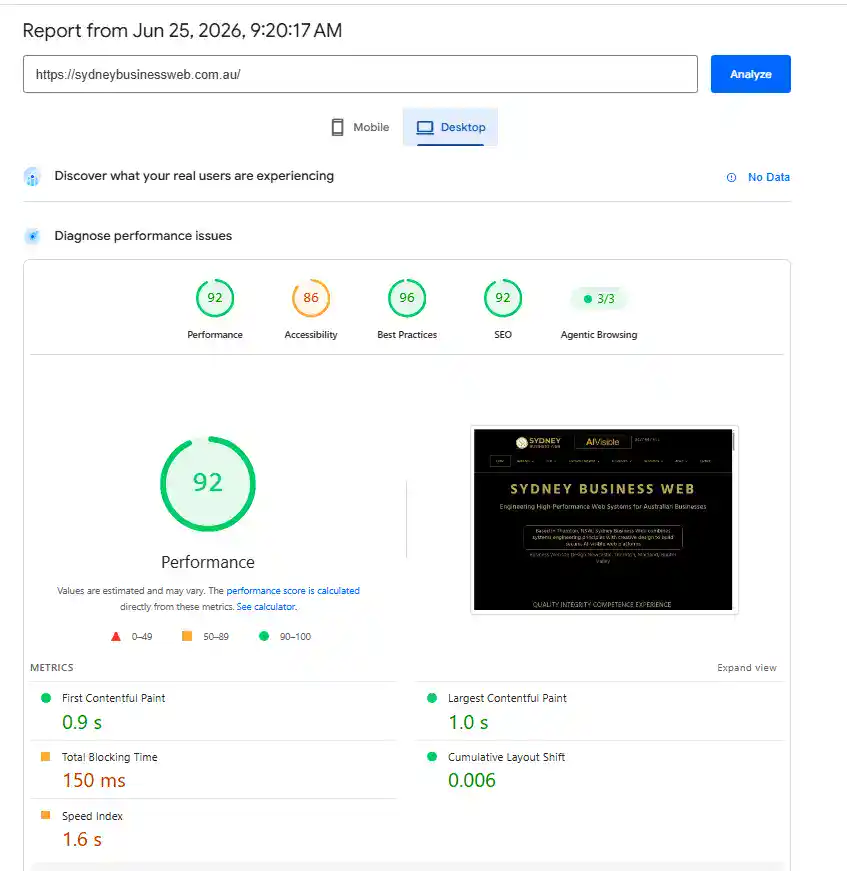
Agentic Browsing Result on Pagespeed
What We Recommend for Other Business Websites
For most business websites, agentic browsing readiness should not begin with hype. It should begin with a practical technical review of how the site is actually being interpreted by browsers, search systems, accessibility tools and AI-oriented audits.
1. Check the rendered page, not just the editor.
A website can look correct inside WordPress while exposing different markup to ordinary logged-out visitors. Testing should be done in an anonymous browser as well as inside the editor.
2. Audit links for clear accessible names.
Every important link, icon, card, phone number, menu trigger and call-to-action should have a meaningful name in the rendered page structure. A link that only makes sense visually may still be weak for accessibility tools and AI agents.
3. Review mobile navigation separately.
Mobile menus often use icon-only triggers. They may work perfectly for a human visitor but still fail machine-readable checks if the trigger has no useful accessible label.
4. Confirm crawler guidance.
The site should have a clean robots.txt file, a declared XML sitemap, and clear rules that do not accidentally block important crawlers or machine-readable files.
5. Consider an llms.txt file.
An llms.txt file can provide a concise machine-readable summary of the business, services, important pages and sitemap. It is not a magic ranking tool, but it is a useful clarity signal for AI-oriented systems.
Google Search note — August 2026: Google states that it does not currently use llms.txt and that the file neither helps nor harms visibility or rankings in Google Search, including AI Overviews and AI Mode. Other AI-oriented systems may still choose to retrieve it as an optional website summary.
6. Investigate layout stability carefully.
Cumulative layout shift should be tested with evidence, not guesswork. Support buttons, videos, fonts, animations, delayed scripts and page-builder sections can all look suspicious, but each cause needs to be isolated before changes are made.
7. Do not rely only on plugin settings.
Some issues cannot be fixed by ticking a box in a page builder, SEO plugin or cache plugin. They may require custom HTML, CSS, JavaScript, PHP, server configuration or direct browser-level debugging.
8. Treat scores as signals, not final truth.
Lighthouse, PageSpeed and similar tools are useful because they expose issues humans may miss. But the proper response is diagnosis, not blind score chasing. Some findings need immediate correction. Others need monitoring, repeat testing and evidence before structural changes are made.
The best agentic browsing work is not cosmetic. It is the disciplined process of making a website clearer, more stable and more meaningful to the systems that now inspect it.
The Sydney Business Web View
Agentic browsing readiness is a natural extension of the kind of technical website work Sydney Business Web already performs. It sits between web development, technical SEO, accessibility, schema, performance optimisation, crawler control and practical WordPress engineering.
This is why the work cannot be reduced to design alone. A modern business website needs to look professional, but it also needs to be technically understandable. It must expose clear links, stable layouts, useful headings, sensible crawler guidance, structured data, readable content and clean machine-readable signals.
For business owners, the important lesson is that the next stage of website quality will not be judged only by what appears on screen. Increasingly, websites will also be judged by how clearly browsers, search systems and AI agents can interpret the structure beneath the design.
That is where technically competent development matters. Sydney Business Web uses page builders where they make sense, but we do not treat them as the whole solution. When the builder output needs custom inspection, custom code, schema work, crawler control, JavaScript fixes, PHP understanding or server-level diagnosis, that technical layer has to be handled properly.
Agentic browsing readiness is not a shortcut and it is not a gimmick. It is part of building websites that are prepared for the way the web is now being read: by humans, search engines, accessibility tools and AI-assisted systems working together.
The future-ready business website is not just attractive. It is fast enough, structured enough, accessible enough and machine-readable enough to be understood beyond the screen.
Frequently Asked Questions About Agentic Browsing Readiness
What is agentic browsing readiness?
Agentic browsing readiness means preparing a website so that browsers, search systems, accessibility tools and AI agents can understand and interact with the page more reliably. It is not just about visual design. It includes link names, layout stability, crawler guidance, structured content, accessible controls and machine-readable files.
Is agentic browsing readiness the same as SEO?
No. It overlaps with technical SEO, but it is not exactly the same thing. SEO focuses on search visibility, indexing, relevance and ranking signals. Agentic browsing readiness focuses more on whether the rendered website can be clearly understood and used by automated systems, AI-assisted browsers and accessibility-aware tools.
Why can a website look fine but still fail agentic browsing checks?
A website can look correct to a human visitor while still exposing weak structure underneath. For example, a page builder may display an icon and caption visually, but the actual clickable link may have no text or accessible name. Humans understand the design. Machines inspect the underlying HTML and accessibility tree.
Why do empty links matter?
Empty links matter because a browser or AI agent may see that a link exists but not understand what the link does. A link with no text, no aria-label, no title and no image alt text is weak for accessibility and machine interpretation.
Can page builders cause agentic browsing problems?
Yes, they can. Page builders are useful, but they can create wrapper links, icon links, overlays, menu triggers and layout structures that look fine visually but are not always ideal in the rendered HTML. This does not mean page builders are bad. It means their output sometimes needs technical inspection and custom correction.
Why is custom code sometimes needed?
Some problems cannot be fixed by changing a normal page-builder setting. A technically competent developer may need to inspect the rendered page, identify the faulty element, and apply safe HTML, CSS, JavaScript, PHP or WordPress-level fixes. This is where technical web development becomes more important than simply knowing how to use a visual editor.
What is llms.txt?
llms.txt is a machine-readable text file placed at the root of a website. It can summarise the business, services, important pages and sitemap for AI-oriented systems. It is not a magic ranking tool, but it can help provide a clearer summary layer for systems trying to understand the site.
Google Search note — August 2026: Google states that it does not currently use llms.txt and that the file neither helps nor harms visibility or rankings in Google Search, including AI Overviews and AI Mode. Other AI-oriented systems may still choose to retrieve it as an optional website summary.
Does robots.txt still matter for AI visibility?
Yes. A clean robots.txt file helps clarify crawler access, sitemap location and crawl restrictions. If important crawlers or useful machine-readable files are accidentally blocked, the website may be harder for search and AI systems to inspect properly.
Why does cumulative layout shift matter for agentic browsing?
Cumulative layout shift matters because automated systems need a stable page to interpret and interact with. If important content or controls move during loading, the page may be harder to evaluate reliably. However, layout shift should be diagnosed carefully. Not every Lighthouse warning means the site is visibly broken to users.
Should every PageSpeed or Lighthouse warning be fixed immediately?
No. Lighthouse and PageSpeed warnings are useful signals, but they still need interpretation. Some issues should be fixed immediately, such as unnamed important links. Other issues, such as intermittent layout shift, may require repeat testing and controlled diagnosis before structural changes are made.
How does Sydney Business Web approach agentic browsing readiness?
Sydney Business Web approaches agentic browsing readiness as technical web development, not marketing theatre. We inspect the rendered page, test the machine-readable layer, review crawler guidance, check accessibility signals, diagnose layout behaviour and apply custom code where needed. The aim is to make the website clearer for humans, search engines, accessibility tools and AI-assisted systems.
External References
These references are included for readers who want to understand the technical layers behind agentic browsing readiness: Lighthouse Agentic Browsing checks, llms.txt, crawler guidance, accessibility inspection, layout stability and browser-level debugging.
Chrome for Developers: Lighthouse Agentic Browsing Scoring
Google’s Chrome documentation explains how the Lighthouse Agentic Browsing category is scored and why it focuses on machine interaction, accessibility and layout behaviour.
Chrome for Developers: Lighthouse llms.txt Audit
This explains the Lighthouse check for an llms.txt file and why it is treated as an emerging machine-readable summary convention.
Google Search Central: Generative AI Search Guidance
Google explains that it does not currently use llms.txt and that the file neither helps nor harms visibility or rankings in Google Search, including its generative AI features.
The llms.txt Proposal
This is the original proposal for using an /llms.txt file to provide concise website information for large language models at inference time.
Chrome for Developers: Accessibility for Agents
This explains why missing labels can affect both accessibility and agent interaction. It is directly relevant to unnamed links, icon links and mobile menu triggers.
Chrome DevTools: Accessibility Features Reference
Useful for understanding how Chrome DevTools exposes the accessibility tree, ARIA attributes and computed accessibility properties of page elements.
Chrome DevTools: Performance Features Reference
This is useful for understanding how Chrome DevTools can be used to inspect performance traces, layout shifts and browser loading behaviour.
Chrome for Developers: Agentic Browsing Layout Stability
This explains why visual stability matters for agent interaction, especially when agents rely on screenshots or coordinate-based interaction.
web.dev: Cumulative Layout Shift
This explains Cumulative Layout Shift, why visible elements moving during page load can affect user experience, and why layout stability needs proper diagnosis.
Google Search Central: Introduction to robots.txt
Useful for understanding how robots.txt controls crawler access and why crawler guidance remains part of the machine-readable layer of a website.
Google Search Central: Build and Submit a Sitemap
This gives background on XML sitemaps and why declaring important site URLs clearly helps search systems discover and understand website structure.
Chrome for Developers: Registered WebMCP Tools
This gives background on WebMCP tools. WebMCP is not required for every normal business website today, but it is relevant to where browser-agent interaction may be heading.
Related Sydney Business Web Articles
These internal references connect this agentic browsing readiness article to related Sydney Business Web work on AI visibility, schema, technical SEO, custom code, crawler behaviour, performance optimisation and real-world WordPress troubleshooting.
How AI Search Architecture Evaluates Your Whole Digital Footprint
This article explains why AI search systems do not judge a business from one page alone. It connects closely with agentic browsing readiness because both depend on clear, consistent, machine-readable signals.
AI Visibility Scores: Don’t Buy the Panic
This article explains why AI visibility claims should be tested with evidence, not accepted from a dashboard score alone. That same evidence-first approach applies to Lighthouse and agentic browsing audits.
Schema and AI Citations: What Structured Data Really Does
Structured data is part of the machine-readable layer of a website. This article explains why schema helps clarify entities, relationships and meaning for search and AI systems.
How to Make Your Business Website Visible to AI
This article gives broader context on AI visibility for business websites, including content clarity, structure and the way AI-assisted systems may interpret a site.
WordPress Custom Code: Why Code Still Matters in a CMS World
Agentic browsing remediation often requires more than page-builder skill. This article explains why custom HTML, CSS, JavaScript and WordPress code still matter on serious business websites.
Website Speed Optimisation: Video-Rich Homepage Hits 93% GTmetrix
This article provides useful background on performance work for a rich media homepage. It connects with the layout stability and performance parts of agentic browsing readiness.
Website Hosting, VPS Performance Optimisation and Evil Bots
Crawler behaviour, bot traffic and server performance all affect how reliably a website can be inspected. This article explains why hosting and server-level tuning matter.
GPTBot Explained: Why AI Is Scanning Your Website
This article explains why AI crawlers may visit a website and what business owners should understand about AI bots, crawler access and website visibility.
Technical Solution Problem 12: Logged-Out Visitors See an Old or Broken Website
This is another real diagnostic case where the visible symptom was misleading. It reinforces the same principle: proper website troubleshooting means proving the technical layer responsible for the fault.
What Is Technical SEO?
Agentic browsing readiness overlaps with technical SEO because both depend on crawlability, structure, performance, accessibility and the machine-readable quality of the site.
Rich Snippets and Schema for Local Business Ranking
This article gives background on structured data, rich snippets and the invisible technical layer that helps search systems understand a business website.
Online Business Engineering: The Rare Standard for 2026
This article explains the wider Sydney Business Web view that a website is not just a brochure. It is a technical business system that must be engineered properly.
CONTACT SYDNEY BUSINESS WEB NOW!