
Technical Solution Problem 14: Cloudflare HTML Caching for WordPress: A Controlled Performance Test
Welcome to Sydney Business Web Technical Solutions Problem 14:
Cloudflare HTML Caching for WordPress
Every day, we solve problems for eCommerce website owners. We had a think about how we might use this activity to help others, and came up with this idea: Every week or three, we'll take the trickiest problem and publish our solution.
Important! - Some of these solututions involve adding code to your website (WordPress and Woocommerce mostly), so please ALWAYS be careful. We are not in any way responsible, directly or indirectly for any impact or consequences our code or advice has on your website, nor are we liable for any damage arising from such use.
Always back up your website before changing or adding code and/or editing the database, This is critically important!!!
Technical Solution Problem 14: Cloudflare HTML Caching for WordPress: A Controlled Performance Test

Cloudflare Nameservers Do Not Automatically Make a Distant Website Fast
It is easy to assume that once a website uses Cloudflare nameservers, Australian visitors will receive the entire site from a nearby Cloudflare data centre. That assumption is only partly true.
Cloudflare normally caches static files such as images, fonts, CSS, JavaScript and video. But the HTML document generated by WordPress is usually treated as dynamic content. Unless HTML caching is deliberately configured, every page visit may still require Cloudflare Sydney to contact the original web server in Europe, retrieve the page, and send it back across the world.
That was exactly what was happening on the Sydney Business Web homepage. The site looked fast, PageSpeed produced excellent results, and the images and video were already being served efficiently from Cloudflare’s Sydney cache. Yet GTmetrix testing from Sydney showed noticeably slower performance and inconsistent time to first byte.
Rather than guessing, we measured every stage separately. We tested the homepage HTML, a local WebP image, an MP4 video stored on Cloudflare R2, direct requests to the Amsterdam origin server, repeated cached and uncached requests, query-string variations, logged-in cookies and the behaviour of pages outside the homepage.
The measurements showed that the media was not the problem. The image arrived in about one tenth of a second. The R2 video was delivered from Cloudflare Sydney using proper byte-range requests. The real delay was the homepage HTML, which was still travelling from Sydney to Amsterdam and back on every anonymous visit.
A previous attempt at broad HTML caching had caused serious errors because the rule was far too wide. This time the approach was deliberately narrow: one exact URL, a five-minute edge cache, logged-in users excluded, query strings excluded, every other page excluded, and redirects or errors explicitly prevented from being stored.
Cloudflare does not remove distance merely because it controls the DNS. It removes distance only when the content you need is actually being served from the edge.

Baseline GTmetrix result from Sydney before Cloudflare HTML edge caching was enabled.
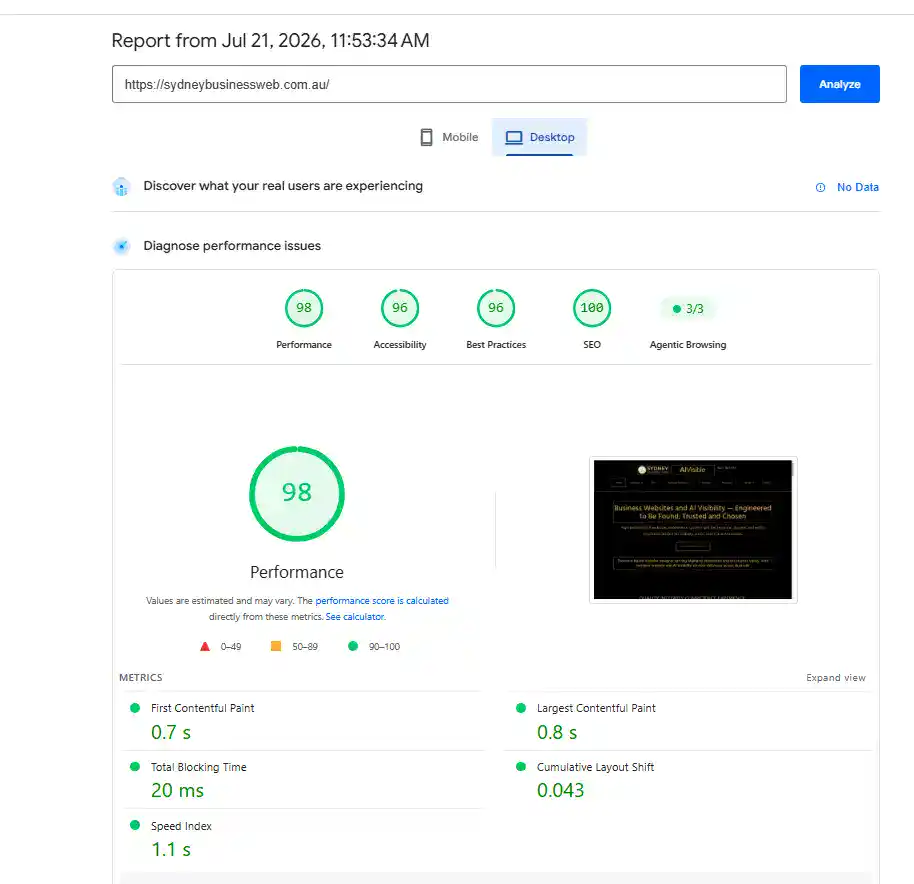
PageSpeed Insights reported excellent performance, creating an apparent contradiction with the Sydney GTmetrix result.
The First Measurement Exposed the Real Problem
The first useful test was not another performance score. It was a direct inspection of the homepage response headers.
The request reached Cloudflare’s Sydney network, confirmed by the CF-RAY value ending in SYD. But the homepage HTML returned:
cf-cache-status: DYNAMICThat single line explained the apparent contradiction. Cloudflare was handling the request in Sydney, but it was not serving the HTML from its Sydney cache. Every anonymous homepage request still required Cloudflare to contact the Amsterdam origin server.
The nameservers were on Cloudflare. The static files were on Cloudflare. But the document that starts the entire page-loading process was still crossing the world.
This is an important distinction. A request passing through a nearby Cloudflare data centre does not prove that the requested content was delivered from there. The decisive value is the cache status:
- HIT means Cloudflare served a stored copy from its edge cache.
- MISS means Cloudflare had to retrieve the file before storing it.
- DYNAMIC means Cloudflare did not cache the response at all.
A Cloudflare location code proves where the request entered the network. The cache status proves where the content actually came from.
The Image and Video Were Not the Bottleneck
The next step was to isolate the major visual assets rather than assume that the page’s images or video were responsible for the slower Sydney result.
The tested WebP image was only 18,062 bytes and returned directly from Cloudflare’s Sydney cache:
cf-cache-status: HIT
Age: 70279
CF-RAY: ...-SYD
TTFB: 0.089 seconds
Total: 0.102 seconds
The MP4 video stored on Cloudflare R2 also behaved correctly. It supported byte-range requests, returned 206 Partial Content, and delivered the requested one-megabyte segment from Cloudflare’s Sydney cache:
HTTP/1.1 206 Partial Content
Content-Range: bytes 0-1048575/1104894
cf-cache-status: HIT
CF-RAY: ...-SYD
TTFB: 0.169 seconds
Total: 0.376 seconds
These results eliminated both visual assets as likely causes. The image arrived in about one tenth of a second, while the first megabyte of video arrived in well under half a second.
Cloudflare was already doing exactly what was expected for static content. The unresolved delay had to be elsewhere.
The media was already fast. The slow component was the HTML document that instructed the browser what to load.
The Origin Server Was Fast When Tested Nearby
The next question was whether WordPress or the shared hosting server was taking too long to generate the homepage.
Repeated requests showed that W3 Total Cache was serving the same cached HTML file each time. The timestamp embedded in the page remained unchanged even when Australian time to first byte varied significantly:
TTFB: 1.520 seconds | W3 Total Cache timestamp: 12:06:04
TTFB: 0.401 seconds | W3 Total Cache timestamp: 12:06:04
TTFB: 1.592 seconds | W3 Total Cache timestamp: 12:06:04
TTFB: 0.537 seconds | W3 Total Cache timestamp: 12:06:04
That ruled out repeated WordPress page generation. The same cached document was being returned during both the fast and slow requests.
A second test used a separate VPS located in Amsterdam as a measuring point close to the shared hosting server. The VPS has no role in serving the Sydney Business Web website; it was simply a convenient test machine near the origin.
From Amsterdam, the complete homepage response was remarkably consistent:
TTFB: 0.058 seconds | Total: 0.065 seconds
TTFB: 0.057 seconds | Total: 0.064 seconds
TTFB: 0.058 seconds | Total: 0.065 seconds
TTFB: 0.049 seconds | Total: 0.055 seconds
TTFB: 0.048 seconds | Total: 0.053 seconds
The origin server, web server and W3 Total Cache were therefore not inherently slow. The same homepage that could take more than 1.5 seconds to begin arriving in Australia was being delivered locally in roughly 50 to 65 milliseconds.
The remaining problem was geographical. Because Cloudflare was treating the homepage HTML as dynamic, Australian requests still depended on the long-distance path to Amsterdam.
The server was fast. The cached page was fast. What remained slow was repeatedly transporting that HTML between Australia and Europe.
The Previous Cache Failure Changed the Design of the New Rule
HTML edge caching had been attempted before, and the result had been ugly. The earlier Cloudflare rule was based on a condition equivalent to the URI path containing /.
Because almost every page path contains a forward slash, that condition was effectively site-wide. It allowed Cloudflare’s HTML caching behaviour to reach far beyond the intended public pages and contributed to incorrect logged-out responses, including homepage errors and redirects.
The solution was not to abandon HTML caching. It was to stop treating a dynamic WordPress site as though every request were interchangeable.
The new pilot rule was deliberately restricted to one exact request:
Hostname: sydneybusinessweb.com.au
URI path: /
Full URL: https://sydneybusinessweb.com.au/
Cookie does not contain: wordpress_logged_in_
Those conditions meant that the rule could match only the clean homepage URL requested by a logged-out visitor.
Several important requests were automatically excluded:
- Every internal page and blog post
- Every homepage URL containing a query string
- Every request carrying a WordPress logged-in cookie
- Every subdomain, including the Cloudflare R2 media domain
The edge cache lifetime was set to only five minutes. More importantly, any origin response with a status code of 300 or higher was assigned No store.
That prevented redirects, missing-page responses and server errors from being stored at the edge—the essential protection absent from the earlier broad experiment.
The safe approach was not “cache everything.” It was “cache one known-good response, briefly, while explicitly excluding everything that could be dynamic or wrong.”
The Rule Was Tested Before the Performance Result Was Trusted
The first successful cache hit was not enough. A fast homepage would be worthless if the rule also cached pages, sessions or responses that should remain dynamic.
Four separate checks were therefore made before judging the performance improvement.
1. The clean public homepage had to be cached:
HTTP/1.1 200 OK
Age: 44
cf-cache-status: HIT
CF-RAY: ...-SYD
This confirmed that the homepage HTML was being served from Cloudflare’s Sydney edge rather than fetched from Amsterdam.
2. An internal article had to remain dynamic:
URL: /antigravity-web-design/
cf-cache-status: DYNAMIC
3. A homepage request containing a query string had to remain dynamic:
URL: /?cfpilot=1
cf-cache-status: DYNAMIC
4. A request carrying a WordPress logged-in cookie had to remain dynamic:
Cookie: wordpress_logged_in_test=dummy
cf-cache-status: DYNAMIC
All four checks behaved exactly as intended. The anonymous homepage was cached, while internal pages, query-string requests and logged-in sessions continued to bypass the edge cache.
Only after those exclusions were verified was the homepage measured again.
A cache rule is not proven safe because one page becomes fast. It is proven safe when every request that should remain dynamic still remains dynamic.
The Result: Homepage TTFB Fell to About One Tenth of a Second
Once the clean homepage response was being served from Cloudflare’s Sydney edge cache, the difference was immediate and unmistakable.
Before HTML caching, repeated Australian tests produced highly variable homepage results:
TTFB before caching: 0.40 to 1.61 seconds
Total HTML time: 0.50 to 2.05 seconds
Cloudflare status: DYNAMIC
After the narrowly scoped Cloudflare rule was enabled, five consecutive homepage requests returned:
TTFB: 0.143 seconds | Total: 0.267 seconds
TTFB: 0.109 seconds | Total: 0.213 seconds
TTFB: 0.091 seconds | Total: 0.198 seconds
TTFB: 0.099 seconds | Total: 0.208 seconds
TTFB: 0.099 seconds | Total: 0.208 seconds
The homepage HTML was now beginning to arrive in roughly 90 to 140 milliseconds instead of waiting as long as 1.6 seconds for the Amsterdam round trip.
The improvement was also visible in the independent GTmetrix test from Sydney:
- Performance score: 80% to 85%
- Largest Contentful Paint: 1.3 seconds to 668 milliseconds
- Structure score: unchanged at 83%
- Cumulative Layout Shift: unchanged at 0.02
The unchanged Structure and layout scores were significant. The page itself had not been redesigned, simplified or rebuilt. Its scripts, markup and visual structure remained the same. The improvement came specifically from removing the long delay before the browser received the homepage HTML.
Total Blocking Time varied slightly between tests, as expected from browser and CPU test conditions. But Largest Contentful Paint was almost halved because the browser could begin constructing the page far sooner.
Nothing visible on the page was changed. The browser was simply given the same HTML from Sydney instead of making a round trip to Amsterdam.

GTmetrix Sydney result after Cloudflare HTML caching reduced LCP from 1.3 seconds to 668 milliseconds.
What This Test Actually Proved
The result was not simply that Cloudflare made the website faster. Cloudflare was already present before the change. The decisive improvement came from changing what Cloudflare was permitted to cache.
The tests established several separate facts:
- The homepage image was already being served from Cloudflare Sydney.
- The R2-hosted video was already being streamed correctly from Cloudflare Sydney.
- W3 Total Cache was already producing and serving a fast cached HTML document at the origin.
- The Amsterdam hosting server was not inherently slow.
- The remaining delay came from retrieving the homepage HTML across the long-distance path for every anonymous request.
That distinction matters because performance tools often encourage people to optimise whatever appears largest or most visually obvious. In this case, compressing the image further, reducing the video, changing the theme or stripping more content from the page would not have addressed the real bottleneck.
The page was waiting before it could begin.
Once that waiting period was isolated, the solution became much smaller than a general site rebuild. One exact public URL was allowed to use a short edge cache, with explicit exclusions for logged-in users, query strings, other pages, redirects and errors.
This also explains why copying a generic “cache everything” Cloudflare recipe can be dangerous on WordPress. A safe rule depends on what the site actually does, which cookies it uses, which URLs are dynamic, how errors are handled and how cached content is purged after changes.
For this site, the correct first step was not broader caching. It was the smallest rule capable of proving the principle without exposing the rest of the website.
The useful optimisation was found by measuring each layer separately, not by guessing which visible asset looked expensive.
This Was Super-Optimisation, Not a Rescue Operation
It is important not to overstate the problem. The Sydney Business Web site was already performing well. Internal pages were being served efficiently through W3 Total Cache, static assets were already reaching Australian visitors from Cloudflare’s Sydney edge, and the site was producing strong PageSpeed and GTmetrix results.
The homepage mattered more because it is the site’s main entry point, the page most likely to receive direct visits, branded searches, crawler attention and first-time users. Even a relatively small delay at that point affects the entire first impression of the website.
This was therefore not an attempt to repair a slow or failing site. It was a forensic analysis of an already fast website, followed by a tightly controlled Cloudflare optimisation aimed at one clearly demonstrated bottleneck.
The remaining pages were deliberately left dynamic. There was no evidence that they required broader HTML edge caching, and no justification for increasing complexity or risk merely to improve benchmark numbers.
That restraint was part of the optimisation. The objective was not to cache as much as possible. It was to remove one proven delay while preserving the behaviour of everything that was already working correctly.
The best performance work does not begin by changing everything. It begins by proving exactly what is slow, fixing only that, and leaving the rest alone.
Conclusion: Measure the Bottleneck Before You Optimise It
Cloudflare was already handling the site’s DNS, proxying requests through Sydney and serving static assets from its edge network. But that did not mean the homepage HTML was cached there.
The decisive evidence was the response header:
cf-cache-status: DYNAMICOnce the image, video, WordPress cache and Amsterdam origin server were tested separately, the real bottleneck became clear. The browser was waiting for the homepage HTML to travel from Australia to Europe and back.
The solution was not a broad “cache everything” rule. It was a narrowly scoped five-minute cache for one exact public URL, with logged-in users, query strings, internal pages, redirects and errors explicitly excluded.
After deployment, the homepage HTML began arriving from Cloudflare Sydney in roughly 90 to 140 milliseconds, compared with earlier results reaching more than 1.5 seconds. GTmetrix Largest Contentful Paint fell from 1.3 seconds to 668 milliseconds without redesigning the page or removing content.
The most important result was not merely the faster score. It was that the improvement was achieved without disturbing the rest of the website.
Good performance engineering is not about caching everything, compressing everything or changing everything. It is about finding the exact delay, removing it safely, and proving that nothing else was broken in the process.
Postscript: The Cache Key Needed One More Safeguard
After the initial test was completed, repeated PageSpeed checks exposed an important mobile-specific issue. Desktop performance remained excellent, but the mobile score fell from its usual 80–82 range to approximately 60, with Largest Contentful Paint rising above seven seconds.
The problem was not heavy JavaScript execution or layout instability. Total Blocking Time remained very low, and the query-string version that bypassed the new HTML cache performed materially better. This pointed back to the Cloudflare cache configuration rather than to a sudden deterioration of the page itself.
By default, the homepage HTML had been using a shared cache key. The rule was therefore amended to enable separate cache variants by device type, allowing Cloudflare to maintain distinct mobile, tablet and desktop homepage responses.
After the new variants were populated, repeated tests stabilised at:
Mobile performance: 81
Desktop performance: 97–99
Mobile Total Blocking Time: 10–30 ms
Desktop FCP and LCP: approximately 0.8 seconds
This does not prove that every WordPress site requires device-specific edge caching. It does prove that this site’s WordPress, Thrive and caching stack produced sufficiently device-sensitive output for a shared HTML cache entry to be unsuitable.
The final rule therefore retained the exact homepage scope, short five-minute lifetime and dynamic-request exclusions, while adding separate cache variants for mobile and desktop traffic.
An optimisation is not finished when the first benchmark improves. It is finished when repeated tests across the relevant devices remain stable.
External Technical References
These official Cloudflare references explain the cache controls used in this test and the device-specific safeguard added after the mobile performance investigation.
Cloudflare Cache Rules
Cloudflare’s guide to controlling which responses are eligible for caching, how long they remain cached and how rules apply to matching requests.
Cache by Device Type
The official configuration example for maintaining separate mobile, tablet and desktop cache variants instead of using one shared HTML cache entry.
Related Sydney Business Web Reading
Further technical work on website performance, machine readability, browser diagnostics and evidence-led WordPress engineering.
Agentic Browsing Readiness for Business Websites
A practical investigation into Lighthouse, machine-readable website structure, accessibility signals, layout stability and the technical faults hidden beneath a visually correct page.
Business Websites Built on Engineering, Not Hype
Browse our articles and case studies on website performance, security, ecommerce, AI visibility and the technical foundations serious Australian businesses depend on.
Frequently Asked Questions
Does using Cloudflare automatically make a WordPress website fast?
No. Cloudflare can proxy traffic, cache static files and reduce network delay, but dynamic HTML may still be retrieved from the origin server for every request. The actual result depends on the cache configuration, the origin location and which responses Cloudflare is permitted to store.
Why was the homepage slower for Australian visitors?
The website origin was located in Amsterdam. Although images and video were already being served from Cloudflare’s Sydney edge, the homepage HTML was still travelling from Australia to Europe and back. That long-distance request created the remaining delay.
What improvement did Cloudflare HTML caching produce?
Homepage time to first byte fell from results as high as approximately 1.6 seconds to roughly 90–140 milliseconds. In the Sydney GTmetrix test, Largest Contentful Paint also fell from 1.3 seconds to 668 milliseconds.
Why not cache every WordPress page at the Cloudflare edge?
Broad HTML caching can accidentally serve inappropriate content, interfere with logged-in sessions or cache redirects and error responses. The safer approach is to cache only the requests that have been proven suitable and explicitly exclude anything that should remain dynamic.
Was this website slow before the Cloudflare change?
No. The site was already well optimised, internal pages loaded quickly, static assets were cached correctly and PageSpeed results were strong. This was a targeted super-optimisation of one remaining homepage bottleneck rather than a repair of a generally slow website.
CONTACT SYDNEY BUSINESS WEB NOW!