
Remote Desktop Hosting Australia
A New IT Service to Business by Sydney Business Web
Remote Desktop Hosting Australia A Turnkey Windows Desktop Solution for SMEs
Run the Windows applications your business depends on without maintaining an office server, complex VPN or ageing local infrastructure. Sydney Business Web provides fully managed remote Windows desktops designed for Australian small and medium-sized businesses.
Many established businesses still rely on Windows-only software: Microsoft Access databases, accounting applications, specialist industry software and bespoke line-of-business systems that cannot simply be moved into a web browser.
Traditionally, that meant maintaining a Windows server in the office, managing remote-access infrastructure, patching it, backing it up and dealing with the consequences when hardware or connectivity failed.
Remote Desktop Hosting Australia provides a cleaner alternative. Your Windows environment runs on managed cloud infrastructure and authorised users connect securely from the office, home or while travelling.
Why Australian SMEs Still Rely on Desktop-Only Software
Not every useful business system belongs in a browser. Many Australian SMEs still depend on mature Windows applications, Microsoft Access databases and specialist software that have evolved around the way the business actually works.
The software may be old. That does not mean it is obsolete.
A bespoke desktop system may contain years of business logic, reporting, automation and operational knowledge. Replacing it merely because it is not browser-based can be commercially foolish.
- Bespoke workflows: Access databases, VBA routines and specialist Windows applications often encode processes that are unique to the business.
- Expensive replacement: Rebuilding a proven desktop application as a modern web application can easily become a substantial software-development project.
- Peripheral integration: Existing applications may already work with printers, PDF generation, scanners, accounting systems and local business processes.
- Users already know it: Replacing the application can also mean retraining staff and changing processes that currently work perfectly well.
The real problem is often the infrastructure underneath it.
Keeping that software running on an ageing office server creates an entirely different set of risks and costs.
- Server maintenance: Windows updates, endpoint protection, backups, user accounts, storage and monitoring all have to be managed.
- Remote-access risk: Directly exposing Remote Desktop to the public internet is poor security practice. Remote access needs to be properly secured, controlled and monitored.
- Hardware dependency: A failed disk, power supply, server or office internet connection can suddenly become a business-wide outage.
- Difficult scaling: Adding users can require more memory, processing power, storage, licensing and network capacity — often on hardware bought years earlier.
Move the user to the application — not the database across the internet.
This matters particularly with applications such as Microsoft Access. Running a database application across an unreliable wide-area network or VPN can produce poor performance and, depending on its design, increase the risk of file or session problems.
With a hosted desktop, the application and its business data can remain together inside the managed Windows environment. Only the remote desktop session travels between the user and the server.
Hardware, patching, backups, remote access and eventual replacement.
Development cost, migration risk, retraining and disruption.
Preserve the applications and workflows that already create value, while moving the server infrastructure into a professionally managed environment.
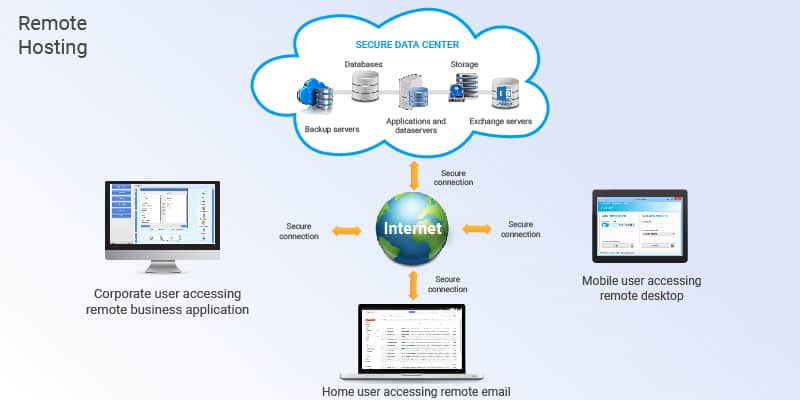
Turnkey Cloud Windows Desktops without handing your business an IT project
Your applications run inside a managed Windows environment while your authorised users connect remotely from their own computers. The infrastructure, security, backups, updates and monitoring are designed and managed for you.
Two approaches. One objective.
There is no single correct platform for every business. We select the architecture according to user numbers, applications, security, performance requirements and budget.
Azure Virtual Desktop
The Microsoft-native Desktop-as-a-Service approach for businesses requiring scalable user sessions, centralised identity and deep integration with Microsoft's cloud platform.
- Managed session hosts Windows desktop resources can be sized and scaled according to actual user demand.
- Microsoft Entra ID security Conditional Access and multi-factor authentication can control who is allowed to access the environment.
- No public RDP port required Azure Virtual Desktop uses Microsoft's reverse-connect architecture rather than exposing TCP 3389 directly to the internet.
- FSLogix user profiles Where appropriate, user profiles can be stored centrally so settings and working environments follow the user between sessions.
- Centralised management Azure Monitor, Azure Update Manager and related Microsoft tools provide visibility into performance, health and patching.
Managed Windows Server / RDS
For smaller or more specialised deployments, a dedicated Windows Server environment can provide a simpler and highly controllable platform without the full Azure Virtual Desktop stack.
- Dedicated Windows environment CPU, memory and storage are sized around the actual applications, number of users and expected workload.
- Correct Remote Desktop licensing Windows Server and Remote Desktop Services licensing is configured according to the selected hosting and user model.
- RDP is not simply exposed to the internet Secure access can be provided through an RD Gateway, VPN or appropriate protected access layer.
- Multi-factor authentication Additional identity controls can be incorporated into the remote access path according to the chosen architecture.
- Backups and monitoring Server health, resource utilisation and availability are monitored, with scheduled backups appropriate to the business workload.
The complicated part disappears.
The authorised user securely signs in from their office, home or remote computer.
Their familiar hosted Windows desktop and authorised applications appear.
Applications and business data remain together inside the managed environment.
Why this can make sense for an SME
Avoid Server CapEx
Avoid buying and periodically replacing an on-premises Windows server simply to keep established applications running.
Predictable Cost
Infrastructure and management move toward a defined operating expense rather than intermittent hardware and repair costs.
Less IT Overhead
Patching, monitoring, backups and infrastructure management are handled as part of the managed service.
Scale More Easily
User capacity and server resources can be increased without replacing physical hardware sitting in the office.
Better Remote Access
Remote access is engineered as part of the system rather than improvised later by opening ports on an office server.
Preserve Existing Software
A business can keep productive Windows applications while modernising the infrastructure underneath them.
It is to put the application in the right environment, secure it properly and remove unnecessary infrastructure headaches from the business.
Remote Desktop Hosting Pricing Predictable monthly costs instead of surprise server bills
Every environment is sized around the applications, users and workload, but the figures below provide a realistic planning guide for a standard Australian SME deployment. Final pricing is confirmed after we review your actual requirements.
Management & Support
The baseline managed-service component covering the health, maintenance and operation of the hosted environment.
- System monitoring and operational alerts
- Windows updates and security patching
- Scheduled environment backups
- Business-hours support and ticket handling
- Infrastructure and performance oversight
- Periodic health and capacity review
Microsoft Cloud Desktop
Indicative per-user pricing for a standard Azure Virtual Desktop deployment, added to the baseline management fee.
Dedicated Hosted Environment
Indicative per-user pricing for a managed dedicated Windows environment, added to the baseline management fee.
What does a five-user system look like?
Using the indicative figures above, a small five-person business can budget approximately as follows.
We quote the environment you actually need.
Larger deployments can improve the economics per user and may qualify for volume pricing.
CPU-intensive databases, accounting systems or specialist applications may require additional server resources.
Large document repositories, databases, backups or retained snapshots may increase storage requirements.
Advanced identity controls, private networking, gateways, VPNs or compliance requirements can affect the architecture.
GPU acceleration or unusually high-memory workloads require appropriately sized cloud infrastructure.
Microsoft and third-party application licensing varies between businesses and is confirmed during solution design.
Before quoting, we review your applications, number of users, storage, licensing, security requirements and expected workload. You then receive a defined proposal for the environment we recommend.
Benefits for Australian SMEs Keep the software that works. Remove the infrastructure headache.
Remote desktop hosting is not about moving technology to the cloud for the sake of it. It is useful when a business already has productive Windows software but wants a safer, more manageable and more flexible way to operate it.
Avoid Buying Another Office Server
Instead of purchasing physical server hardware, maintaining it for years and eventually replacing it, the infrastructure becomes a managed operating expense.
Reduce Day-to-Day IT Overhead
Windows patching, server health, backups, capacity and remote-access infrastructure all require attention. In a managed environment, those responsibilities become part of the service rather than another job for somebody inside the business.
Engineer Remote Access Properly
Remote access should not mean opening RDP directly to the public internet and hoping a password is enough. The access architecture is designed around identity, authentication and controlled connectivity.
- Multi-factor authentication where supported by the selected platform and identity architecture.
- Protected remote access using Azure Virtual Desktop reverse-connect architecture, RD Gateway, VPN or another appropriate secure access layer.
- Encrypted sessions between the remote client and hosted environment.
- Centralised patching and monitoring rather than relying on an unmanaged office machine.
- Access logging can be configured where auditability is required.
Add Capacity Without Replacing Hardware
A physical server is purchased at one size and gradually grows old. Hosted infrastructure can instead be resized as user numbers, storage or application demand changes.
Your Desktop Can Travel With You
Authorised users can connect from supported computers and mobile devices while working from the office, home or elsewhere with suitable internet connectivity.
Modernise on Your Own Timeline
Hosting an existing Windows application does not prevent a later migration to newer software, a database platform or a purpose-built web application.
Remote Desktop still depends on a usable internet connection.
Cloud hosting cannot overcome a genuinely poor or unavailable local connection. What it can do is reduce the amount of business data travelling backwards and forwards between a remote user and the application itself.
The Windows application and its database can remain together in the hosted environment while the user's device primarily receives the desktop display and sends keyboard and mouse input.
Sometimes the sensible engineering decision is not to rebuild the application. It is to give the application a better place to live.
Test Your Windows Application First A practical proof-of-concept before full deployment
We do not expect you to move a business-critical application simply because somebody says it should work in the cloud. A short proof-of-concept lets us test the real application, with a real workflow, before designing the production environment.
Does your application actually work well remotely?
The objective is not to produce a theoretical architecture diagram. It is to put your Windows application into a temporary hosted environment and see how it behaves.
That might be a Microsoft Access database, specialist accounting software, an internally developed Windows application or another line-of-business system that your staff depend on every day.
Six practical steps from application to evidence
Review the Application
We identify the software, database, files, peripherals, licensing and normal user workflow before building anything.
Provision a Test Environment
We create an appropriately sized temporary Azure or managed Windows environment based on what is actually being tested.
Configure Secure Access
Remote access is configured using the security model appropriate to the selected platform rather than simply exposing an RDP port to the public internet.
Install and Run the Application
The application, supporting files and test data are installed and exercised using representative business tasks.
Test the Real Workflow
We check the things that actually matter: logon experience, application responsiveness, file access, PDF creation, printing requirements and other key processes.
Measure, Decide and Tear Down
We review the result with you. If the concept is unsuitable, the temporary resources are removed. If it works well, the findings become the basis for the production design.
A decision based on evidence, not a sales promise.
Whether the existing Windows application behaves correctly in the proposed hosted environment.
Whether normal user workflows feel sufficiently responsive under representative conditions.
A better understanding of the CPU, memory, storage and networking the production system is likely to require.
Evidence to choose between Azure Virtual Desktop, managed Windows Server/RDS or another sensible approach.
Small test. Small commitment.
A straightforward proof-of-concept normally requires only a limited amount of engineering time and temporary cloud resources.
Production environments may require additional security, backup, licensing, monitoring, redundancy and capacity design. A successful demo proves the application concept; it does not bypass proper production engineering.
Hosting an Access-Based Shipping Database Preserving a proven workflow without a costly software rewrite
One Sydney printing-services SME depended on a bespoke Microsoft Access system to manage consumables, service activity and shipping documentation across Australia. The software worked. The problem was how to keep it accessible, reliable and supportable without rebuilding the whole application.
Up to five authorised users
Typically no more than three simultaneous sessions
Bespoke Microsoft Access workflow
Approximate cost quoted to rebuild as a web application
The database had become part of the business.
Field technicians used the Access front end several times each day to record device alerts, manage consumable requirements and generate shipping documentation.
Generated PDFs were saved into the shared working environment and distributed to regional warehouses for fulfilment.
Replacing the system would therefore mean more than replacing a database. It would mean reproducing years of embedded workflow, training users on a new system and accepting migration risk.
The better question was whether the existing system could be given a more suitable infrastructure platform.
Keep the application and its data close together.
The important architectural principle was to avoid making the Access application continually work across a wide-area network connection. Instead, the application, database and generated files could reside together inside the hosted Windows environment.
Hosted Windows Environment
A Windows desktop environment was sized around the small user group and the relatively modest Access workload.
Application & Data Together
The Access application, supporting files and generated PDFs remained within the hosted environment, reducing dependence on database traffic crossing the public internet.
Controlled Remote Access
Users connected through a secured remote-access architecture with identity controls appropriate to the selected Microsoft platform rather than exposing ordinary RDP directly to the internet.
User Profiles & Storage
User settings and shared business data were centrally managed so each authorised user could access the same working environment.
Backup & Monitoring
The hosted environment could be backed up and monitored centrally rather than relying on a single office server and ad-hoc maintenance.
Capacity Without New Hardware
Additional user or resource capacity could be added without purchasing and installing another physical server.
Rewrite the application
Approximately A$20,000- Recreate existing business logic
- Data migration and testing
- User retraining
- Implementation risk
- Potential workflow changes
Keep the working application
Managed monthly operating cost- Preserve familiar workflows
- Avoid major development expenditure
- Remove dependence on office-server hardware
- Provide managed remote access
- Retain the option to modernise later
Modernise the infrastructure, not necessarily the application.
The business could continue using an application that already supported its operational requirements rather than funding a complete rebuild immediately.
Users continued working with familiar software, PDFs and operational processes instead of learning an entirely new system.
The business no longer needed to treat an ageing office server as the permanent home of a business-critical application.
Hosting the application does not prevent a later database migration or web redevelopment if the commercial case eventually justifies it.
If an existing application still creates business value, the smartest investment may be to improve the environment around it rather than replace it simply because newer technology exists.
SLA & Support Desk Clear expectations when something needs attention
A managed desktop service needs more than a server and a login. It needs somebody responsible for monitoring the environment, maintaining it and responding when users encounter a problem. Our standard support model is deliberately simple: direct, principal-led technical support with defined business-hours response targets.
Australian Eastern business hours
9:00 am to 5:00 pm Sydney time
Within eight business hours for standard tickets
No junior helpdesk hand-off
What is included?
Support for the hosted environment is included within the agreed management service. The exact scope is documented in your proposal, but a standard deployment normally covers the following.
Login failures, session problems and connectivity issues affecting access to the managed desktop environment.
Operating-system patching, routine maintenance and configuration issues within the managed environment.
Monitoring the configured backup process and investigating failures or abnormal backup conditions.
Hosted profile, shared-storage and file-access problems that fall within the managed platform.
Investigation of unusual CPU, memory, storage or session behaviour affecting the hosted system.
Advice when growth in users or workload suggests that the environment should be resized or reconfigured.
A simple incident process
Send the problem through the agreed support channel with the affected user, application and symptoms where possible.
We determine whether the problem relates to the hosted platform, Windows environment, connectivity, application or another dependency.
We apply the appropriate fix or workaround and advise you of progress, dependencies and any further action required.
Response time is not the same as resolution time.
Our standard SLA defines how quickly we respond and begin dealing with an incident. It cannot guarantee that every issue will be permanently resolved within the same period.
Some incidents depend on Microsoft, a hosting provider, third-party software, internet services, licensing vendors or other systems outside our direct control.
What we can promise is ownership: once an issue falls within the managed-service scope, we investigate it, communicate clearly and continue working toward resolution.
Support should not begin only when somebody complains.
Where supported by the selected architecture, the environment can be monitored for conditions such as resource pressure, failed backups, availability problems and other technical events that warrant investigation.
Included in the managed environment
- Business-hours technical support
- Managed Windows infrastructure
- Routine patching and maintenance
- Configured backup oversight
- Hosted-session troubleshooting
- Platform performance investigation
Requirements outside the standard model
- 24×7 staffed helpdesk coverage
- Guaranteed after-hours engineer availability
- Third-party application development or debugging
- User desktop/device support outside the hosted environment
- Major application upgrades or migrations
- Special compliance or high-availability requirements
If your operation genuinely requires 24×7 response, shorter incident targets or more resilient infrastructure, we will scope that separately. We would rather price the requirement properly than pretend a business-hours support model is a 24-hour enterprise helpdesk.
For an SME, good support does not require layers of helpdesk bureaucracy. It requires somebody competent who understands the environment and takes responsibility when it needs attention.
From Existing Windows Application to Managed Desktop A straightforward process with no commitment to rebuild what already works
You do not need to arrive with an Azure design, server specification or licensing model. Tell us what your business runs today, who uses it and what is causing the problem. We will determine whether remote desktop hosting is sensible and recommend the appropriate architecture.
Tell Us What You Run
We start with the application and the way your staff actually use it.
- Applications and databases involved
- Number of users and typical concurrent sessions
- Current server or hosting arrangement
- Storage and shared-file requirements
- Printing, PDF or peripheral requirements
- Expected growth over the next 6–12 months
We Recommend the Architecture
Rather than asking you to choose between technologies, we assess which platform best fits the workload.
Test the Application
Where appropriate, we build a temporary environment and test representative workflows before committing to production.
- Application launch and compatibility
- Login and session experience
- Database responsiveness
- File and PDF workflows
- Printing or peripheral requirements
- Resource and capacity observations
Approve the Production Design
Once we understand the workload, you receive a defined proposal covering the recommended platform, management scope, indicative capacity and monthly pricing.
Deploy, Secure & Manage
We build the production environment properly, migrate the agreed applications and data, configure users and security, and begin ongoing management.
- Production infrastructure deployment
- User and identity configuration
- Application and data migration
- Security configuration
- Backup and monitoring setup
- Managed support begins
A small proof-of-concept can answer the important questions.
For a straightforward application, indicative proof-of-concept pricing starts around the figures below. The exact scope is confirmed before we provision anything.
Keep the Windows applications your business depends on. Lose the ageing server underneath them.
Managed Windows desktop environment
No major up-front server purchase
Secure engineered remote access
Managed patching, backups and monitoring
Defined business-hours support
Option to test before full deployment
Show us the application you need to keep running.
We will look at the users, software, data and existing infrastructure and tell you whether a managed remote desktop is a sensible solution. If it isn't, we will tell you that too.
Pricing shown on this page is indicative and in Australian dollars. Final costs depend on the selected infrastructure, Microsoft and third-party licensing, storage, user numbers, workload, security requirements and any additional services required at the time of deployment.
Remote Desktop Hosting Australia FAQs Practical answers before you move a business-critical application
Remote desktop hosting can be an excellent solution for the right Windows application — but the architecture, security, licensing and workload still need to make sense. These are the questions we are most likely to discuss before recommending a deployment.
What is Remote Desktop Hosting Australia?
Remote Desktop Hosting Australia is a managed Windows desktop service from Sydney Business Web for Australian businesses that need remote access to existing Windows applications, databases and business data without maintaining their own office server.
What types of applications can be hosted on a remote Windows desktop?
Suitable workloads can include Microsoft Access databases, accounting applications, bespoke Windows software and other line-of-business applications. Compatibility, licensing, performance and peripheral requirements are reviewed before production deployment.
Do I need to choose between Azure Virtual Desktop and Windows Server RDS?
No. Sydney Business Web reviews your applications, number of users, workload, security requirements and budget before recommending the appropriate architecture. This may be Azure Virtual Desktop or a managed Windows Server and Remote Desktop Services environment.
How much does Remote Desktop Hosting Australia cost?
Indicative planning figures are around A$750 per month for baseline management and support, plus approximately A$100 per user per month for a standard Azure Virtual Desktop deployment or approximately A$90 per user per month for a managed Windows Server or RDS deployment. Final pricing is confirmed after technical review and depends on infrastructure, licensing, storage, workload and security requirements.
Can I test my application before committing to a full deployment?
Yes. Sydney Business Web can build a temporary proof-of-concept environment so representative application workflows can be tested before a production system is approved. Indicative proof-of-concept pricing starts around A$225 for Azure Virtual Desktop and A$300 for a managed Windows or RDS environment, depending on scope.
Can Microsoft Access databases run in a hosted remote desktop environment?
Yes, many Microsoft Access applications can operate effectively in a hosted Windows environment. A useful architecture is often to keep the Access application, database and related files together inside the hosted environment rather than sending database traffic across a wide-area network. The individual application should still be tested for compatibility before production deployment.
How is remote access secured?
Security depends on the selected architecture. Azure Virtual Desktop can use Microsoft's reverse-connect architecture without exposing a public RDP port, together with Microsoft Entra ID, Conditional Access and multi-factor authentication where configured. Managed Windows Server or RDS environments can use protected access such as RD Gateway, VPN, firewall controls and appropriate identity security rather than exposing ordinary RDP directly to the internet.
Does remote desktop hosting work with a poor internet connection?
Remote desktop hosting still requires a usable and reasonably stable internet connection. Hosting can reduce the amount of application and database traffic travelling between the user and the server because the application and data remain together in the hosted environment, but it cannot overcome a genuinely poor or unavailable internet connection.
Can users print from a hosted Windows desktop?
Printing and PDF workflows can often be supported, but compatibility depends on the application, printer, drivers and remote desktop architecture. Important printing, label-generation or peripheral workflows should be tested during the proof-of-concept.
What support does Sydney Business Web provide for Remote Desktop Hosting Australia?
The standard managed-service model provides direct technical support from Monday to Friday during Sydney business hours, generally 9:00 am to 5:00 pm, with a response target of within eight business hours for standard support tickets. Response time is not the same as guaranteed resolution time.
Are backups and monitoring included?
Backup, monitoring and maintenance are designed as part of the managed environment. Depending on the selected architecture, this can include scheduled backups, Windows patch management, server health monitoring, resource monitoring and investigation of abnormal conditions.
Can Remote Desktop Hosting Australia help avoid rewriting an existing application?
Yes. If an existing Windows application still meets the business requirement and works correctly in a hosted environment, remote desktop hosting can provide an alternative to immediately rebuilding it as a web application. The business can modernise the infrastructure underneath the application while retaining the option to redevelop it later.
Who manages the hosted Windows environment?
Sydney Business Web manages the agreed hosted environment, including infrastructure configuration, routine Windows maintenance, backup oversight, monitoring and support within the scope defined in the customer proposal.
That is exactly what the initial technical review and proof-of-concept are for. We would rather discover a limitation before deployment than after it.
Have a Windows application your business still depends on?
Show us what you run today, how your team uses it and what problem you are trying to solve. We’ll assess whether a managed remote desktop is the right answer — and if it isn’t, we’ll tell you.