
Technical Solution 18: Backing Up Cloudflare Workers, D1 Databases and Managed VPS Infrastructure
A Real-World Business Backing Up Cloudflare Workers, D1 Databases and Managed VPS Infrastructure
Every day, we solve problems for eCommerce website owners. We had a think about how we might use this activity to help others, and came up with this idea: Every week or three, we'll take the trickiest problem and publish our solution.
Important! - Some of these solutions involve adding code to your website (WordPress and Woocommerce mostly), so please ALWAYS be careful. We are not in any way responsible, directly or indirectly for any impact or consequences our code or advice has on your website, nor are we liable for any damage arising from such use.
Always back up your website before changing or adding code and/or editing the database, This is critically important!!!
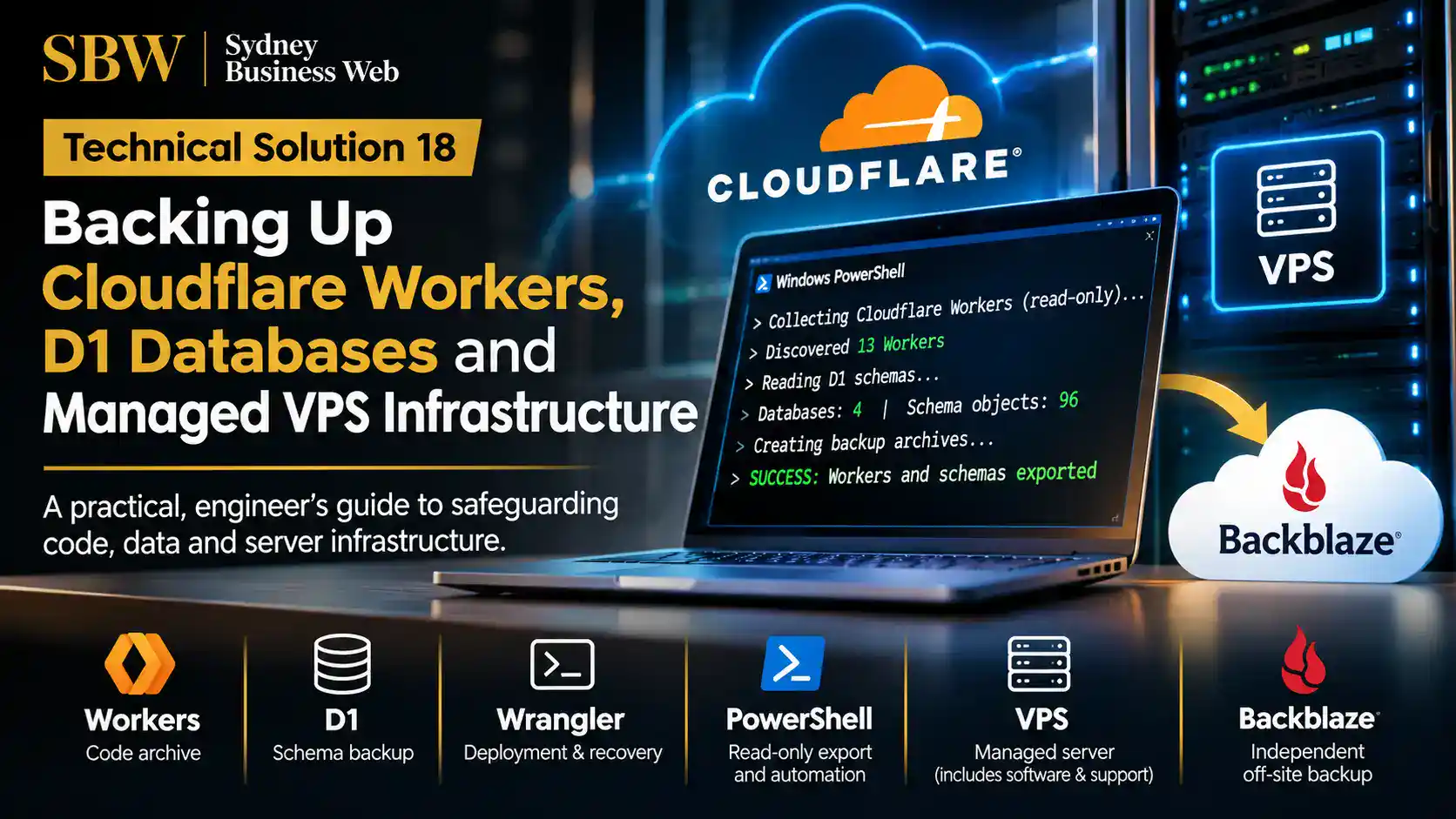
Protecting cloud infrastructure: a practical engineering approach to archiving Cloudflare Workers, documenting D1 database schemas and maintaining independent VPS backups.
The Infrastructure Was Working. But Could We Rebuild It?
Running business-critical web infrastructure involves more than keeping websites online. There is another engineering responsibility that receives far less attention: making sure the systems can be recovered if something goes wrong.
At Sydney Business Web, our infrastructure includes managed VPS hosting, Cloudflare Workers, D1 databases and custom services developed to support our AI visibility and website engineering operations.
These systems were operating normally. This was not an investigation into a server failure or a response to lost data. It was a deliberate examination of something equally important: how independently recoverable was the infrastructure we had built?
A working system is not necessarily a recoverable system. Availability and recoverability are two different engineering disciplines.
Two Environments. Two Different Backup Challenges.
Our infrastructure presented two distinct challenges. Cloudflare hosts programmable services and database resources, while our managed VPS provides the conventional server environment supporting websites, applications and associated services.
Both environments benefit from managed infrastructure, but neither should be treated as a substitute for maintaining independent, usable recovery copies.
01. The Cloudflare Environment
Cloudflare Workers contain application logic, while D1 databases hold structured application data. Routes, domains and deployment configurations also matter. We wanted an independent record of our Worker estate and its database structures, rather than relying exclusively on the live Cloudflare account.
02. The Managed VPS Environment
Our VPS hosting includes software management and technical support. However, configuring suitable backups, arranging independent off-site copies and checking recovery arrangements remain responsibilities we must actively manage. We wanted those arrangements to be explicit rather than assumed.
03. Security and Automation
Backup procedures should minimise unnecessary permissions and avoid exposing credentials. We therefore used read-only Cloudflare API access and PowerShell scripts designed to keep authentication tokens out of the resulting archives.
04. Evidence, Not Assumptions
We wanted verifiable outputs: Worker inventories, archived files, database schema records and documented VPS backup arrangements. Successful collection is one important milestone, although complete recovery assurance also requires appropriate restoration testing.
Turning the Question Into a Practical Exercise
We approached the work as an engineering exercise, using the tools already available to us: Cloudflare's API, Wrangler, Windows PowerShell, VPS administration interfaces and Backblaze.
The Cloudflare collection produced an archive covering 13 Workers, along with route and domain information. A separate read-only operation documented the schemas of four D1 databases, identifying 96 schema objects in total.
We subsequently completed full exports of all four D1 databases, including their stored data. The encrypted archive was independently preserved and verified using SHA-256 on 8 November 2026.
Our initial schema snapshots documented database structures without their stored records. The subsequent Wrangler exports closed that data collection gap, although restoration testing remains a separate requirement.
Separately, we established an independent off-site backup arrangement for our managed VPS using Backblaze, addressing a different part of the infrastructure recovery problem.
The objective was not to replace the services provided by Cloudflare or our hosting company. It was to establish independent protection appropriate to the systems we operate.
And that leads to the first practical question: how do you safely archive an entire Cloudflare Worker estate without changing anything in production?
Archiving 13 Cloudflare Workers — Without Touching Production
Our first objective was straightforward: obtain an independent, organised record of the Cloudflare Workers supporting our business, without making changes to the live applications.
Cloudflare Workers are serverless applications. They execute code on Cloudflare's network and can provide APIs, process requests, collect operational evidence and support other application services.
Our own Worker estate had grown through ongoing development of AI visibility tools, reporting systems and website infrastructure services. Several Workers also depended on routes, bindings or external resources.
While Cloudflare provides the infrastructure needed to operate these services, we wanted independent copies of the deployed code and an inventory of the associated configuration.
The challenge was not simply saving some JavaScript files. It was preserving enough information to understand, maintain and eventually reconstruct the applications independently of the live account.
The First Tool: PowerShell Automation
Rather than open each Worker in the Cloudflare dashboard and manually collect its code, we used a PowerShell script communicating with the Cloudflare API.
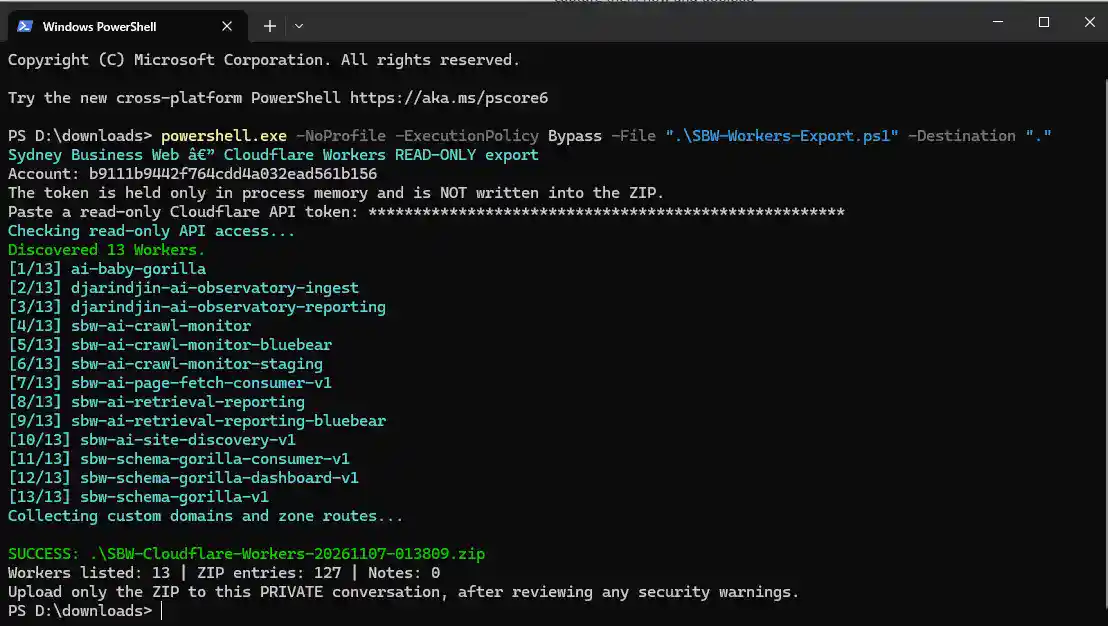
The script performed a read-only collection operation. It identified the available Workers, retrieved their deployed content and collected associated routing information before packaging the results into a ZIP archive.
Authentication used a restricted API token, supplied during execution. The token was retained in process memory and was not written into the resulting archive.
What Did the Export Actually Produce?
The resulting archive provided a dated snapshot of the deployed Worker estate, including the collected route and domain records. The script completed successfully without modifying production Workers.
The Biggest Time Saver: Cloudflare Wrangler
The PowerShell export provided a broad infrastructure snapshot. But there was a second objective: bringing Worker source code into GitHub, where it could be preserved, reviewed and version-controlled as part of our development workflow.
This is where Cloudflare Wrangler proved particularly valuable.
Wrangler is Cloudflare's command-line interface for developing and managing Workers. One particularly useful capability is retrieving an existing dashboard-created Worker into a local project.
Without that capability, recovering source from dashboard-managed applications can become a repetitive process of manually copying code, identifying configuration details and reconstructing files.
Wrangler provides a substantially faster starting point.
npx wrangler init --from-dash WORKER_NAME
The command initialises a local project from a named Cloudflare Worker. It does not deploy changes to the live Worker, and it does not automatically create or update a GitHub repository.
It does, however, remove a considerable amount of the initial manual collection work. Once the retrieved project has been checked, organised and supplemented with any required configuration or documentation, it can be committed to a private GitHub repository.
The major efficiency gain was the elimination of repetitive manual work. Wrangler shortened the journey from a deployed Cloudflare Worker to locally accessible code suitable for review and GitHub archiving.
Our Practical Archiving Workflow
Identify and Inventory
Use the Cloudflare API and PowerShell to identify deployed Workers and collect the available infrastructure information into a dated archive.
Retrieve Source with Wrangler
Retrieve individual Worker projects locally, providing a practical starting point for independently maintaining the deployed application code.
Review Before Archiving
Check project contents, configuration, dependencies and references to external resources. Remove sensitive material and document anything needed for a future deployment.
Preserve in GitHub
Archive the reviewed project in version control, retaining its history and documentation. This provides an independent record of the code and subsequent changes.
Why Use Both PowerShell and Wrangler?
These tools address related but different requirements.
PowerShell is particularly useful for collecting information across multiple resources in a consistent, repeatable operation.
Wrangler provides the application-development interface for working with individual Worker projects, including retrieving existing deployed code.
GitHub then provides source-code version control and an independent location for maintaining reviewed project files and documentation.
Used together, they create a more efficient route from a collection of live cloud applications to organised, independently maintained source archives.
Important: A Source Archive Is Not a Complete Disaster Recovery Backup
Retrieved Worker code may represent the deployed or bundled application rather than the complete original development project. Original dependencies, build procedures and source history may require separate preservation.
Worker secrets, database contents and some external resources are not recovered simply by saving application code. Routes, bindings, environment settings and deployment procedures must also be documented and checked.
GitHub archiving therefore improves source-code protection and maintainability, but a complete recovery strategy must account for the wider application environment.
Cloudflare documents the Wrangler retrieval command and its limitations in its official Wrangler command reference.
Our initial Cloudflare exercise had produced two useful outcomes: an independently stored snapshot of the Worker estate and a much more efficient method for preparing individual applications for GitHub archiving.
However, Workers are only part of the Cloudflare environment. Several of our applications also depend on D1 databases.
Preserving the code is one challenge. Preserving the database structures and the data they contain is another.
Four D1 Databases. From Schema Inspection to Full Backup.
Our Cloudflare applications rely on more than Worker source code. They also use D1 databases to store information generated during application operation.
We addressed database protection in two stages: first documenting the database structures using PowerShell, then exporting the complete database contents with Cloudflare Wrangler.
Read-Only Schema Collection
A custom PowerShell script inspected four known D1 databases using fixed, read-only metadata queries.
It recorded the database structures without exporting application records or modifying production data.
Result: 96 schema objects documented, zero failures.
Full Database Exports
We subsequently used Cloudflare Wrangler to export all four D1 databases, including their stored application data.
The SQL exports were packaged into an encrypted archive and independently preserved in a private GitHub repository.
Result: Four full database exports, with archive and copy verification.
First, We Documented 96 Schema Objects
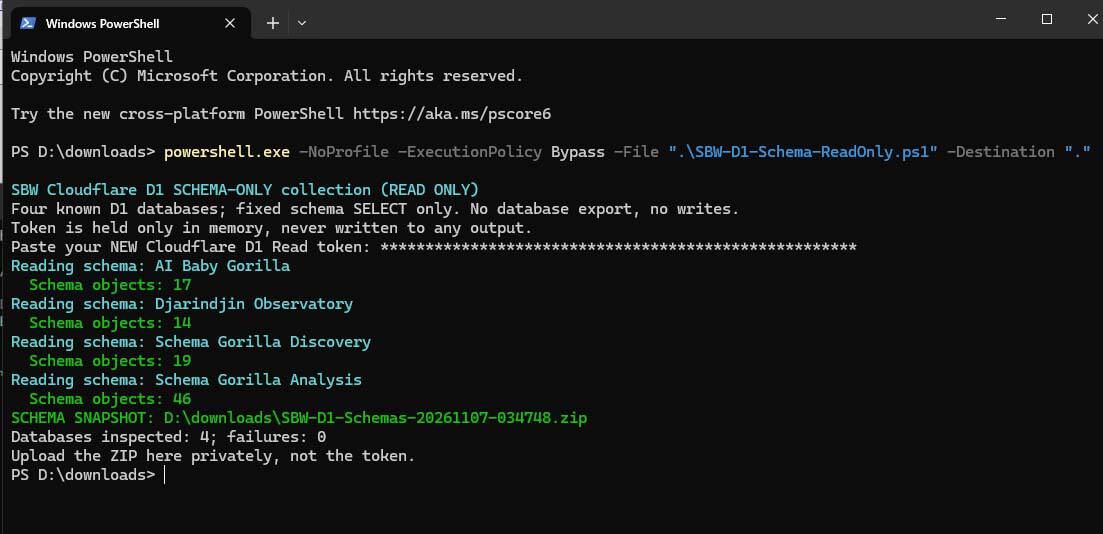
The initial schema collection was designed as a repeatable inventory operation. It provided a useful record of database design, rather than a restorable copy of the application data.
Wrangler also supports schema-only exports using its built-in --no-data option. Our custom PowerShell procedure served the narrower purpose of collecting and summarising schema metadata across several databases in one operation.
We subsequently completed full SQL exports of all four databases using Cloudflare Wrangler.
The resulting SQL files were packaged into a compressed, encrypted 7-Zip archive. Archive integrity testing completed successfully.
An independent copy was placed in a private GitHub repository. We then verified the downloaded copy against the local archive using SHA-256 file hashes.
This established a separately retained and integrity-checked copy of the exported database information.
Two Backup Methods. Two Different Purposes.
PowerShell Schema Snapshot
Records SQL definitions and database structures.
Useful for inventory, review and understanding application database design.
Does not include application records.
Wrangler Full Export
Exports supported database structures and stored application records to SQL.
Provides substantially more complete recovery material and an independent data copy.
Still requires a tested restoration procedure.
The Wrangler Export Command
Cloudflare provides a supported command for exporting a remote D1 database to an SQL file.
npx wrangler d1 export DATABASE_NAME --remote --output=./database.sql
This is a generic example. Running the export can temporarily block other requests to the database, so production scheduling requires care.
What About D1 Time Travel?
Cloudflare also provides Time Travel point-in-time recovery for supported D1 databases. Its retention period is 30 days on Workers Paid and 7 days on Workers Free.
That capability is useful for recovering from recent database mistakes, but independent exports provide a separately retained record beyond those rolling recovery windows.
Official references: D1 import and export and D1 Time Travel .
The D1 work progressed beyond an initial schema inventory. We completed full database exports, secured an independent archive and verified the integrity of the retained copy.
A complete restoration test remains a separate engineering requirement. But the data collection and independent archiving stages are no longer outstanding.
With our Cloudflare application code and database information independently archived, the next area was the managed VPS and its longstanding backup arrangements.
A Fully Managed VPS. But Who Manages the Backups?
Our next task concerned a different type of infrastructure: the managed Virtual Private Server supporting our conventional web hosting operations.
Unlike Cloudflare Workers, a managed VPS operates as a conventional server environment, with an operating system, web server software, databases, email services and individual hosting accounts.
The hosting provider supplies substantial technical management. But that does not automatically mean every aspect of data protection and recovery is included.
The Important Distinction
Managed Infrastructure Does Not Automatically Mean Managed Backups
Our managed VPS includes hosting software administration, operating system maintenance, security updates and technical support within the provider's service scope.
However, configuring and maintaining the appropriate backup arrangements is a separate operational responsibility.
≠
Backed Up
Technical management and independent data protection are related, but they are not the same service.
Understanding the Responsibility Boundary
In our environment, the distinction can be summarised as follows.
Managed Server Services
- Operating system maintenance and security patching
- Supported server software management
- cPanel and WHM hosting environment
- Provider-managed firewall and infrastructure security
- Technical support and investigation of server-level problems
Operational Protection
- Configuring backup schedules and retention requirements
- Selecting and maintaining independent off-site storage
- Checking backup completion and recoverability
- Defining website-specific security and bot access requirements
- Working with hosting support when legitimate traffic is affected
This is not a criticism of managed hosting. It is a necessary distinction between maintaining a server and protecting the information it contains.
Bot management illustrates the same shared-responsibility principle. A provider may administer the firewall and server security software, while the website operator must identify legitimate application traffic, investigate access problems and request appropriate rule adjustments where needed.
The Tools Were Already There: WHM and cPanel
One advantage of our managed VPS is that the WHM administration interface includes an established backup management system.
Rather than develop another custom backup application, we could use the server's existing software to configure the backup process.
Enable scheduled backups explicitly. Backup capability does not itself guarantee backups are running.
Set backup frequency, timing and retention appropriate to the hosting workload.
Select account backups and, where required, supported system configuration backups.
Configure remote storage so that backup copies are maintained away from the VPS.
Simplified overview of the WHM interface; not a reproduction of our live settings.
WHM also supports backup destination validation and management, allowing administrators to check the connection to configured remote storage.
Importantly, the backup configuration must account for available disk space, transfer times and retention. A poorly planned local backup process can consume storage that the live server needs for normal operation.
Taking the Backups Off the VPS
Keeping backups on the same server provides some convenience, but it creates an obvious dependency. A serious server-level incident could affect both the live data and locally stored backup copies.
We therefore used Backblaze as an independent off-site destination for our managed VPS backup arrangement.
Simplified backup architecture. Exact backup contents depend on the WHM configuration and selected data.
WHM supports Backblaze B2 as a remote backup destination. This allows administrators to use an existing hosting backup interface rather than construct a separate transfer system.
The arrangement gives us an additional layer of protection outside the hosting environment and reduces dependence on a single infrastructure provider.
The important improvement was not changing hosting providers or replacing the server software. It was making independent backup protection an explicit, managed part of operating the VPS.
One More Distinction: Backup Completion Is Not Recovery Proof
As with our Cloudflare archives, there is an important difference between creating a backup and demonstrating that the required systems can be restored.
Confirm that scheduled jobs run, the intended accounts and files are included, and remote transfers complete successfully.
Verify that the required backup copies are actually present at the remote destination, with suitable retention.
Test recovery using an appropriate isolated environment, rather than assuming that a successful upload guarantees a successful restore.
Understand the difference between restoring hosting accounts, selected system configuration and reconstructing an entire VPS.
This last point is particularly important. WHM account backups and supported system backups do not necessarily constitute a complete, bootable VPS image.
Some system configuration may require separate preservation, and restoring a complete hosting environment may involve rebuilding the underlying server before importing its accounts.
Our backup work established independent off-site protection. It should not be presented as proof of complete disaster recovery until the appropriate restoration procedures have also been tested.
For technical details, see the official WHM Backup Configuration documentation, including supported Backblaze destinations and remote backup settings.
The VPS exercise demonstrated that the necessary backup facilities were available within our existing hosting environment.
The engineering task was to configure them correctly, provide independent off-site storage and establish clear responsibility for checking the results.
Across Cloudflare and our managed VPS, the same lesson was emerging: infrastructure protection depends on knowing exactly what has been archived, where it is stored and what is required to recover it.
Established Backup Practices. New Cloud Infrastructure Protection.
Sydney Business Web has maintained backups of its hosting infrastructure for years, using various methods as our requirements evolved.
The newer challenge emerged from developing our AI visibility applications. Traditional hosting backups do not automatically preserve Cloudflare Workers, D1 databases and their supporting configuration.
Why Backblaze Was the Better VPS Solution
Retaining large historical backup archives on a production VPS consumes storage also needed by websites, databases, logs and routine server operations.
BACKUPS
Independent Storage, Less Pressure on the VPS
Backblaze B2 allows retained backups to be stored outside the VPS, separating backup storage from the live hosting environment.
This reduces the production disk capacity needed for historical backup retention and provides an independent storage destination.
Those advantages made it preferable to our earlier approaches for the current hosting requirements.
WHM may still use temporary local disk space when preparing and transferring backups.
The Completed Work: Our Engineering Scorecard
The outcomes are best assessed by separating source-code collection, database preservation and hosting backup arrangements.
A read-only PowerShell collection covered 13 deployed Workers, producing an archive with 127 entries and no reported collection notes.
Wrangler substantially reduced the time required to retrieve individual Worker projects for review and GitHub archiving.
Worker Collection CompletedA separate PowerShell process inspected four D1 databases using read-only queries, recording 96 schema objects with zero failures.
Schema Inventory CompletedOn 8 November 2026, we completed Wrangler exports of all four D1 databases, including their stored data.
Approximately 292 MB of SQL exports were packaged into a compressed, encrypted 7-Zip archive.
The archive passed integrity testing, was preserved in a private GitHub repository, and its downloaded copy was verified against the original using SHA-256.
Full Data Archived & VerifiedWe continued our established VPS backup practice using independent Backblaze B2 storage for retained copies.
The arrangement reduces dependence on VPS disk capacity for historical backup retention.
Off-Site Arrangement EstablishedThe completed archives provide valuable independently retained recovery material.
Full restoration tests, Worker secret recovery procedures and preservation of relevant Cloudflare zone configuration require separate verification.
Further Verification RequiredThree Lessons From the Exercise
Use Existing Platform Tools
Wrangler, PowerShell, the Cloudflare API and WHM supplied practical solutions without requiring another complex management platform.
Automation Saves Time
Wrangler made retrieval of Worker projects much more efficient. PowerShell enabled repeatable collection across the broader infrastructure.
Independent Copies Matter
Off-server VPS storage, private source archives and independently verified database exports reduce reliance on live production environments.
Further Recovery Work
The next phase of infrastructure assurance will examine:
- Isolated restoration testing for the exported databases and relevant hosting accounts.
- Independent preservation of Cloudflare DNS, rules and deployment configuration.
- Recovery procedures for Worker secrets and bindings, with secret values secured separately.
- Additional verification of backup retention, access permissions and deletion protection.
- Establishing scheduled, recurring D1 database exports with secure off-site retention and verification.
Infrastructure protection is strongest when its recovery material exists independently of the systems it protects.
Our longstanding VPS backup procedures have evolved toward independent Backblaze storage. The newer Cloudflare work extends that engineering discipline to the applications supporting our AI visibility products.
The results include archived Worker code, documented D1 schemas, complete D1 data exports and independently verified backup copies.
Just as importantly, the combination of Wrangler, PowerShell and existing administration tools has made the process substantially more efficient and repeatable.
The remaining work is recovery assurance: proving that the relevant applications and hosting services can be reconstructed when required.
Frequently Asked Questions About Infrastructure Backups
Our experience with Cloudflare, Wrangler, PowerShell, GitHub and managed VPS hosting raises several practical questions about what backups preserve and how they support recovery.
Does Cloudflare automatically back up everything needed to restore a Worker?
No. Cloudflare provides deployment, versioning and recovery facilities, but a Worker source archive alone does not preserve every dependency required to reconstruct an application.
Routes, bindings, external services, database contents, configuration and secret values may require separate protection.
Why use Wrangler instead of manually copying Worker code?
Wrangler can retrieve existing deployed Worker code into a local project, substantially reducing repetitive manual work.
For Sydney Business Web, this made preparing Worker projects for private GitHub archiving considerably more efficient. Retrieved projects still require review of configuration, dependencies and source completeness.
Can GitHub serve as a complete Cloudflare disaster recovery backup?
GitHub is valuable for preserving version-controlled source code, configuration and documentation. It is not automatically a complete application recovery system.
We also used a private repository to retain encrypted D1 database exports. The archive was tested, and the downloaded copy was verified against the original using SHA-256.
Those checks establish archive and copy integrity, not a completed application restoration.
Is a D1 schema snapshot the same as a full database backup?
No. A schema snapshot records the database structures but excludes the application records stored within them.
We initially documented 96 schema objects across four D1 databases using PowerShell. On 8 November 2026, we subsequently completed full Wrangler SQL exports of all four databases, including their stored data.
The exports were compressed into an encrypted archive, independently retained in private GitHub storage and verified using SHA-256.
Are Cloudflare Worker secret values included in Wrangler archives?
No. Worker secret values are deliberately hidden after they are configured and cannot be read back through Wrangler, the Cloudflare dashboard or the API.
Administrators can document which secret names an application requires, but the values must be maintained separately in secure credential storage. They should never be committed to a GitHub source repository.
Does a fully managed VPS include automatic customer backups?
Not necessarily. Managed hosting may include software administration, security updates and technical support without automatically providing an independently retained customer backup arrangement.
The precise responsibilities depend on the hosting contract. Administrators should verify the backup configuration, retention and recovery services actually provided.
Why did Sydney Business Web choose Backblaze for VPS backups?
We have maintained hosting backups for years using various methods.
Backblaze B2 became our preferred arrangement because retained backups reside outside the production VPS, reducing dependence on its disk capacity and separating stored backups from the live server.
Does using Backblaze eliminate local VPS backup disk usage?
Not entirely. WHM may still require temporary working space while generating or transferring backups.
The principal advantage is avoiding the need to retain large historical backup archives on the production VPS itself.
How can administrators verify that their backups are recoverable?
Check that backup jobs completed, required files are present, archive integrity tests pass and independent copies can be retrieved successfully.
The strongest assurance comes from restoring the required systems in an isolated test environment and verifying that the restored applications function correctly.
Our completed archive checks provide evidence of successful preservation. Full end-to-end restoration testing remains a separate engineering task.
All four D1 databases were exported with their stored data on 8 November 2026. Their encrypted archive passed integrity testing, and the independently retained copy passed SHA-256 verification.
Technical References and Related Investigations
Related Sydney Business Web engineering studies appear alongside the official documentation for the platforms used in this investigation.
Sydney Business Web
Related technical case studies and AI infrastructure
Our earlier examination of conventional VPS and WordPress backup methods.
Our Cloudflare-based monitoring infrastructure for verified AI crawler retrieval evidence.
Whole-site structured-data and business identity analysis supported by our cloud applications.
Our one-page structured-data connectivity checker, supported by Cloudflare Workers and D1.
Engineering crawler monitoring using Cloudflare Workers at the network edge.
A production investigation into security-layer restrictions affecting legitimate AI crawler traffic.
Official Technical Documentation
Cloudflare, cPanel, Backblaze and GitHub
Worker development, deployment and source retrieval commands.
Full SQL database exports and schema-only operations.
Point-in-time database recovery, with retention determined by the Workers plan.
Secure configuration of Worker credentials and handling of secret values.
Backup scheduling, retention, storage and remote destinations.
Off-site object storage for independent backup retention.
Source-code management, repository documentation and security.