

AI scraping can overwhelm business websites, slow genuine customers and threaten sales when automated traffic goes unchecked.
AI crawlers and automated bots can overwhelm website servers, slow customer requests and cause lost sales — even when the website appears perfectly healthy. Is your hosting provider watching?
AI Scraping Can Cripple Business Websites — And Cost Them Sales
Your website looks fine. The homepage loads quickly. You can log in, browse the products and place an order. Everything appears normal. But what are your customers experiencing?
Behind the scenes, AI scraping and automated crawlers may be hammering hundreds or thousands of URLs, consuming CPU capacity, occupying PHP workers and generating expensive database requests. Genuine customers can be left waiting for pages to load, encountering intermittent errors or abandoning purchases altogether.
And simply paying for more powerful hosting may not solve it. More resources can mean more money spent accommodating automated visitors that contribute little or nothing to your business.
Before deciding what to block, optimise or upgrade, two questions must be answered: who is accessing your website, and what impact is that activity having on your server?
That's why Sydney Business Web combines AI Observatory crawler evidence with expert server performance analysis. First identify the automated traffic. Then measure its effect on hosting resources. Only then decide what action is justified.
Not Every Bot Deserves Your Server Resources
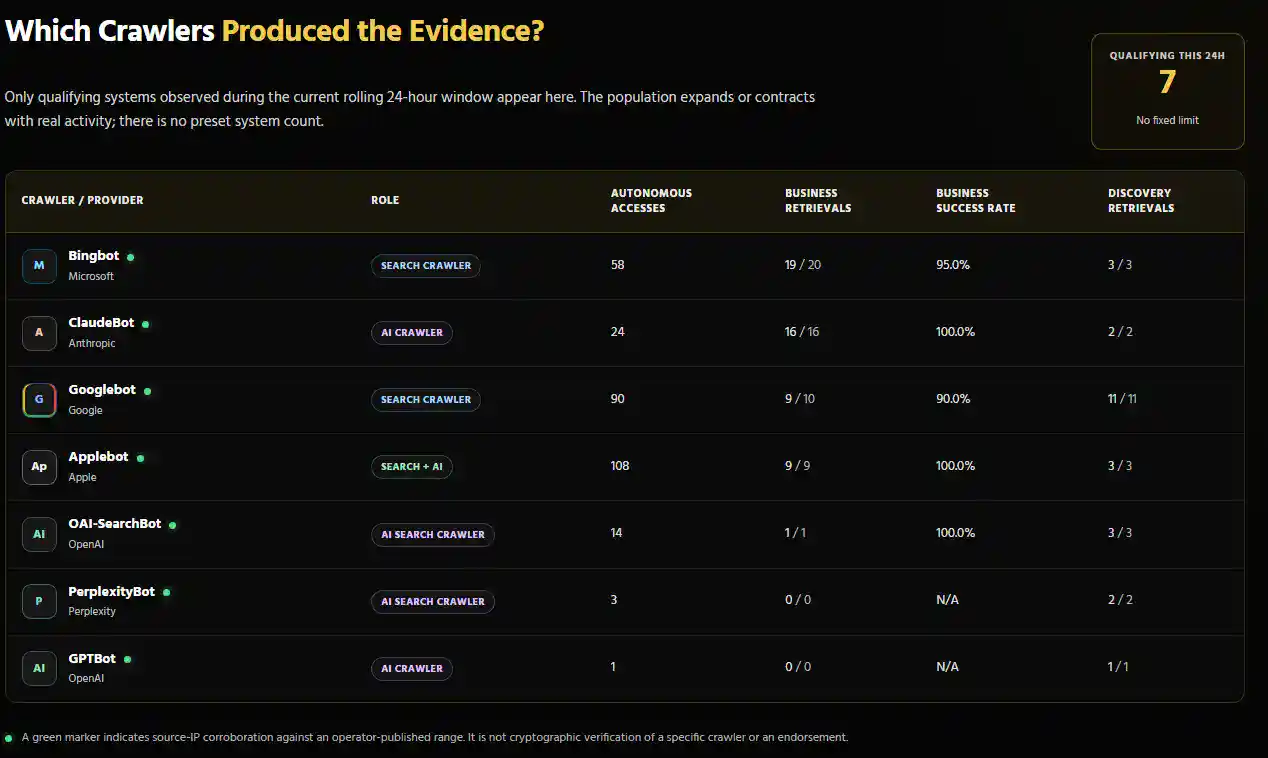
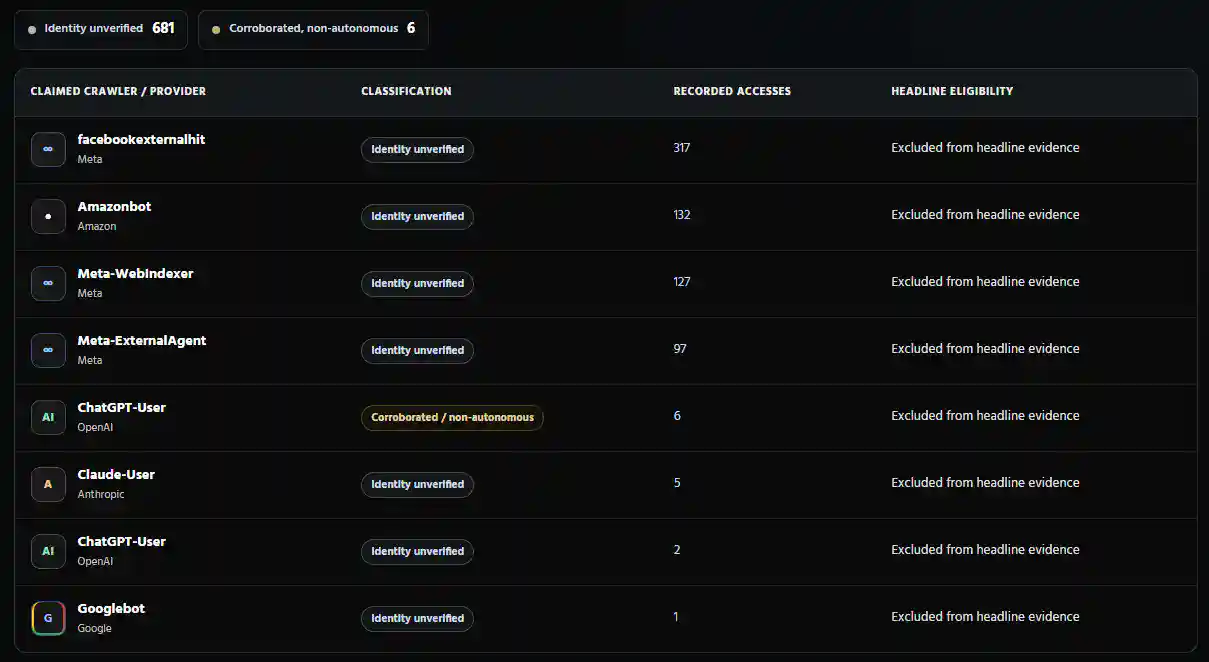
Some automated visitors help customers discover your business. Others may generate enormous amounts of traffic without delivering meaningful commercial value. The first challenge is knowing which is which.
When Website Traffic Becomes a Server Problem
Excessive automated requests can occupy PHP workers, increase database activity and drive CPU utilisation upwards. When available capacity is exhausted, genuine customers may experience slower pages or intermittent failures.
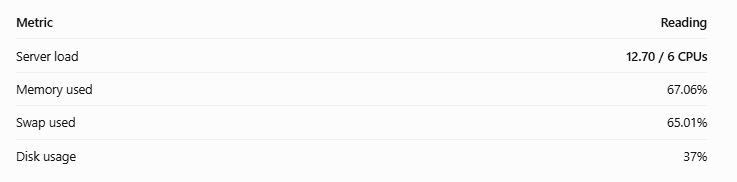
First identify the traffic. Then establish its processing cost. Only then decide what deserves access to your server.
Why Are You Paying for Traffic That May Never Buy Anything?
Imagine an Australian business selling camping equipment exclusively to Australian customers. Its hosting account has finite processing capacity. Every expensive automated request competes for a share of that capacity.
An Australian Camper
A potential buyer searches for a tent, visits your store, compares products and heads towards checkout.
Fast pages matter. So does a checkout that works without delays or errors.
A Baidu Crawler
Now imagine a Baidu search crawler repeatedly requesting product and category pages.
If your business serves only Australia, how much commercial value does that overseas search exposure provide?
If both are competing for server capacity, which one should get priority?
This isn't an argument for blocking every foreign crawler. Some overseas search and AI systems may be valuable discovery channels. Others may offer little benefit to a locally focused retailer.
Nor should a claimed crawler name be accepted at face value. Identity, request behaviour, processing cost and business relevance all matter before restrictions are introduced.
Your Web Host Says Everything Is Fine. But Are Customers Getting Through?
Your hosting provider reports that the server is online. CPU usage looks reasonable. Your homepage loads quickly. Yet during periods of heavy automated crawling, customers may be experiencing something very different.
Everything Looks Healthy
Server online. No current outage reported.
CPU usage normal. At the moment the check runs.
Homepage loads quickly. A cached page responds in milliseconds.
HTTP 200. The tested request was successful.
AI Bot Overload Can Slow Your Website, Drive Customers Away and Cost You Sales.
Three Warning Signs Your Host Should Investigate
Repeated CPU Spikes
Heavy automated traffic can push processor demand towards capacity. A later snapshot may look normal after the overload has passed.
PHP Worker Exhaustion
Crawlers requesting expensive pages can occupy available PHP workers, leaving legitimate customer requests waiting in a queue.
Automated Request Surges
Sudden increases in bot activity can coincide with slow responses, timeouts and HTTP 503 errors. Access logs help identify what is happening.
A website can appear healthy between periods of overload. That's why expert hosting management requires regular traffic analysis, resource monitoring and performance checks — not simply confirmation that the server is online.
Your Customers Won't Tell You Your Website Is Slow. They'll Just Leave.
When a customer encounters a painfully slow website, they have a simple alternative: close the page and visit a competitor. They don't need to explain why. And you may never know that a potential sale was lost.
Mobile Visits Abandoned
Google's research found that 53% of mobile site visits were abandoned when pages took longer than three seconds to load.
Source: Google, 2016 researchShoppers Have Abandoned Carts
In a consumer survey, 76% reported having abandoned a shopping cart because of slow website performance.
Source: Liquid Web, 2025Went to a Competitor
More than half of surveyed consumers said they had switched to a competitor's website after experiencing delays.
Source: Liquid Web, 2025No Complaint. No Support Ticket. Just a Customer Who Never Bought.
The Invisible Lost Sale
A visitor clicks a product, waits, becomes frustrated and leaves. Your business receives no explanation. Without performance monitoring, the reason may remain hidden.
The Cost of Doing Nothing
If automated traffic repeatedly overloads your hosting resources, those slow experiences can recur. Every affected customer represents another potential lost opportunity.
The real danger isn't simply that AI scraping can slow your website. It's that customers may be leaving while nobody is measuring the problem.
Research context: Google's figures describe historical mobile-page abandonment. Liquid Web surveyed 1,007 US consumers about shopping behaviour. These studies measure the commercial effects of slow websites generally; they do not attribute those effects specifically to AI scraping.
Stop Guessing. Start Measuring.
If AI scraping is slowing your website, throwing more money at hosting isn't automatically the answer. You need evidence of who's accessing your site and what those requests are doing to the server.
Who's Accessing Your Website?
AI Observatory by Sydney Business Web provides evidence of AI crawler access and retrieval outcomes.
- Identify observed AI crawler activity
- Corroborate crawler identities where verification is available
- Examine requested resources and HTTP response outcomes
- Distinguish qualifying retrievals from excluded traffic evidence
What's That Traffic Costing You?
Expert hosting diagnostics establish how automated activity relates to application and infrastructure pressure.
- Examine Apache access patterns and request timing
- Measure CPU and memory demand
- Investigate PHP-FPM worker saturation and database pressure
- Correlate traffic spikes with slow responses and errors
Knowing Who Visits Is Important. Knowing What Their Visits Cost Is What Makes Action Possible.
Three Steps to Better Website Protection
Identify
Establish which automated systems are visiting, what they request, and whether their identities can be corroborated.
Measure
Compare crawler activity with server utilisation, PHP worker pressure, request durations and customer-facing errors.
Act
Use the evidence to improve caching, restrict unnecessary traffic or adjust capacity. Then measure the results.
Is Your Hosting Provider Actually Watching?
Sydney Business Web combines AI crawler visibility with hands-on server engineering to identify performance risks, investigate their causes and protect the experience of genuine customers.
AI Scraping, Hosting and Lost Sales: The Important Questions
Can AI scraping really slow down a business website?
Yes. Large volumes of automated requests can consume CPU time, occupy PHP workers and increase database activity. If demand exceeds available processing capacity, genuine customers may experience slow pages, timeouts or server errors.
Why does my website appear fast when I test it?
You may be testing a cached page or visiting between periods of heavy traffic. Product searches, checkout operations and other dynamic requests can perform very differently from a cached homepage. A successful test does not rule out intermittent performance problems.
Can a slow website cost my business sales?
Absolutely. Customers may abandon slow pages or shopping carts and visit competitors. Many will leave without contacting the business. The actual revenue impact requires business-specific conversion and transaction data to quantify.
Should I block all AI crawlers and scraping bots?
No. Some crawlers support search discovery and AI visibility, while others may provide little commercial benefit. Identity, behaviour, request volume and server impact should be examined before introducing restrictions.
What should my website hosting provider monitor?
Important measurements include crawler activity, request rates, response times, CPU utilisation, PHP-FPM worker saturation, database performance and HTTP errors. Regular analysis helps reveal problems that occasional server checks may miss.
How does AI Observatory help protect website performance?
AI Observatory by Sydney Business Web provides evidence of monitored AI crawler activity and retrieval outcomes. Combined with expert server diagnostics, this helps identify relevant automated traffic, assess its infrastructure impact and determine appropriate action.
The Evidence Behind the Warning
The commercial research establishes why website speed matters. Technical documentation and our original server investigation explain how automated traffic can contribute to performance problems.
Google — Mobile Page Speed Research
Google's 2017 publication reports research finding that 53% of mobile site visits were abandoned when pages took longer than three seconds to load.
Read Google's researchLiquid Web — Every Second Counts
Survey of 1,007 US consumers examining website delays, shopping cart abandonment, competitor switching and brand trust.
Read the consumer studyGoogle — Robots.txt and Crawler Controls
Official guidance on controlling crawler access and understanding the limitations of robots.txt instructions.
Read Google's documentationOpenAI — Overview of AI Crawlers
Explains the different roles of GPTBot, OAI-SearchBot and ChatGPT-User, including website-owner crawler controls.
Read OpenAI's documentationPHP — FastCGI Process Manager
Official PHP-FPM configuration documentation, including process management, worker limits and slow-request diagnostics.
Read PHP-FPM documentationSydney Business Web — Technical Solution 20
Original investigation of automated crawler traffic, VPS resource pressure, PHP-FPM saturation, HTTP failures and caching. Also published on Zenodo.
Read the research publicationDon't Wait Until Customers Walk Away.
AI scraping and automated traffic could be slowing your website and costing you sales. Would you even know?
Identify the Bots
Understand relevant AI crawler activity, request patterns and retrieval outcomes.
Investigate the Load
Examine server performance, PHP workers, CPU demand and expensive requests.
Protect Your Customers
Make informed decisions about caching, bot restrictions, optimisation and hosting capacity.