
The Starting Point: What Was Going Wrong
Why is my website slow in Australia? You’re probably not imagining it — websites can run fast where they’re built and hosted, yet crawl painfully slowly elsewhere. We discovered this firsthand from our base in Thornton, NSW. Locally, our site loaded fairly quickly but in our opinion, not quickly enough. But for users in other parts of Australia, the experience was frustrating. That kind of inconsistency doesn’t just hurt user experience — it affects SEO, trust, and conversions.
The Starting Point: What Was Going Wrong
We had reliable hosting with solid specs, fast local speed, and a clean design. But SEO tools flagged issues: missing schema, render delays, and sluggish performance in diverse loactions. We fixed the schema, optimised delivery with WebP images and lightweight assets — but we knew we could do better.
We asked the same question many Australian business owners do: why is my website slow in Australia?, even when the hosting is excellent and the design fully optimised? The answer isn’t just in your server — it’s in how your site is delivered, cached, and protected across the country (and the globe).
What We Used: Free Tools That Actually Work
Rather than woking even more on hosting and optimization of content, we looked for a smarter solution. Our focus was on improving delivery, caching, and security without adding cost or complexity.
We landed on two powerful free tools:
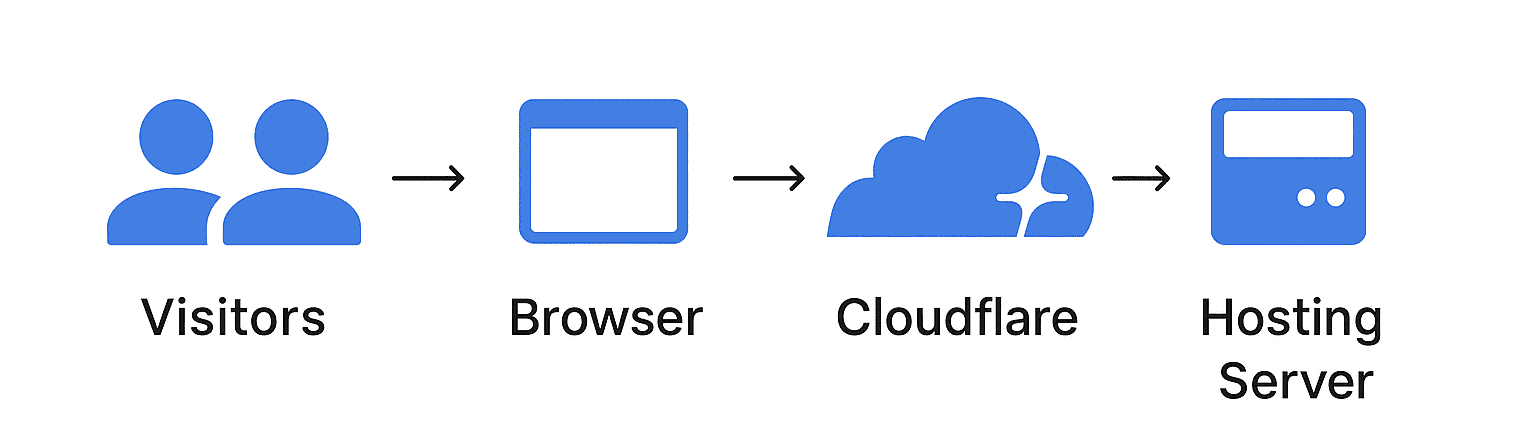
- Cloudflare – A global content delivery network (CDN) and firewall that routes traffic through its fast, secure edge servers.
- W3 Total Cache – A trusted WordPress plugin that optimises how pages, images, scripts, and stylesheets are stored and served.
Combined, they gave us control over how our website performed not just in NSW, but across Australia and beyond — without touching the core design or switching hosts.
Setting It Up Right: Where Most People Go Wrong
Cloudflare and W3 Total Cache are powerful, but they're not magic. If you configure them poorly, you can make your site slower, less secure, or outright broken — and most guides out there gloss over these risks.
Here are the most common pitfalls we avoided:
- Caching the wrong content: Many people cache pages for logged-in users, which breaks admin features, shopping carts, and user sessions.
- Double caching conflicts: Using both W3TC and Cloudflare without telling one to respect the other causes stale content, broken forms, or layout bugs.
- Purging too often or not at all: Excessive purging slows things down; no purging means updates don’t show.
- Ignoring local loopbacks: Some plugins like Wordfence need the site to talk to itself — and Cloudflare can block that if not configured properly.
We took a measured approach: caching public pages only, excluding sessions and AJAX paths, and deactivating W3’s Cloudflare integration to avoid overlap.
The Results: What Changed Immediately
Within hours of the changes, we saw measurable improvements. Page speed increased dramatically across Australia — not just in NSW — and Google began crawling and indexing our pages more reliably.
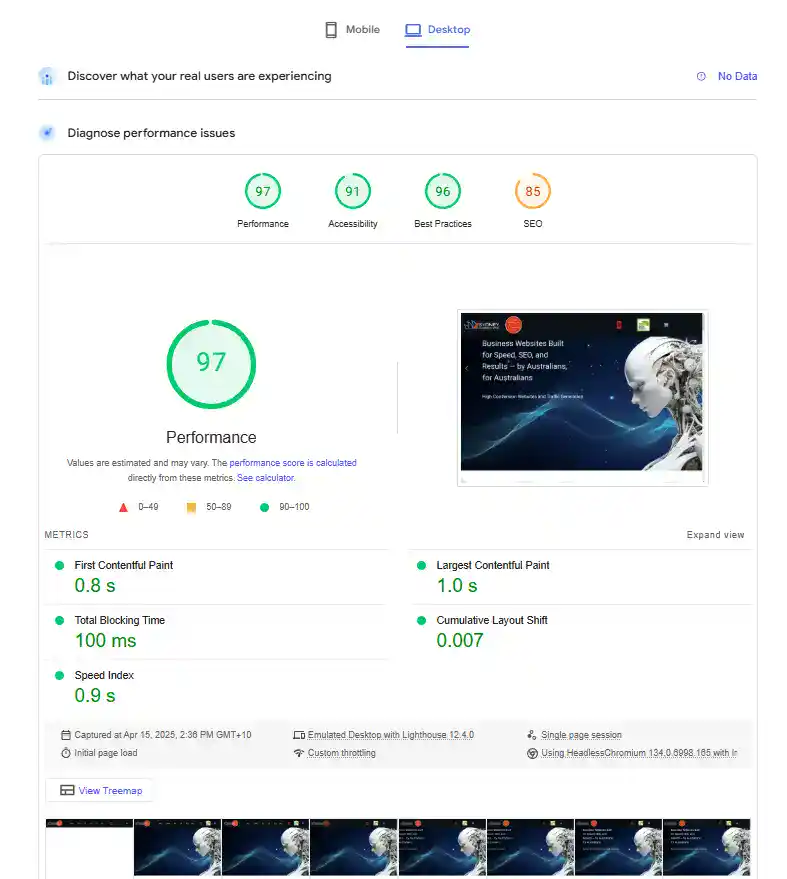
We ran a full Lighthouse audit from an emulated desktop session and hit scores of:
- Performance: 97
- Accessibility: 91
- Best Practices: 96
- SEO: 85 (pre-schema enhancements)
Most importantly, users reported snappier performance from areas previously affected by lag, and Google Search Console confirmed successful schema detection. Our site began loading faster, indexing more reliably, and ranking more confidently — without touching our design or moving our hosting.
Here’s a snapshot of the Lighthouse results taken after the changes:
Why This Matters for Australian Businesses
Many Australian websites are built by local developers and hosted on reliable domestic servers — but that’s no longer enough. Your customers, partners, and Google itself may be accessing your site from different regions, devices, and connection speeds. If your site doesn’t load fast everywhere, you’re leaking conversions and credibility.
Our hosting provider uses a manycast network, which helps route traffic efficiently. But to truly deliver speed and security everywhere, we needed a content delivery strategy that worked at the edge — not just from a single server location.
Cloudflare’s global network bridges that gap. Combined with properly configured caching via W3 Total Cache, we now serve optimised content from the nearest point of presence, no matter where the request originates.
For Australian businesses — including those in New South Wales and regional areas like ours in Thornton — this setup levels the playing field with competitors in larger cities or international markets.
More Than Just Speed: The Security and Stability Gains
While performance was our primary goal, the benefits of this setup went far beyond load times. Once we properly configured Cloudflare and W3 Total Cache, we gained stability, protection, and better control over who and what accessed our website.
Some of the added wins:
- DDoS mitigation: Cloudflare shields us from brute-force attacks and traffic floods — often before they even hit our server.
- Bot mitigation: We automatically challenge or block scrapers, fake crawlers, and aggressive AI tools like GPTBot, CCBot, and SeekrBot — without affecting search engines like Google or Bing.
- Country-level firewall rules: We restricted access from high-risk regions where we don’t operate, reducing spam, form abuse, and brute force attempts.
- Loopback protection bypass: We allowed safe internal requests so plugins like Wordfence could work without false errors or scan failures.
- Session-aware caching: Logged-in users, carts, and admin sessions are excluded from caching — preserving functionality and security where it matters most.
The result? Less server strain, fewer alerts, and a quieter Wordfence log — without sacrificing performance or user experience.
It Still Takes Expertise — Here's What to Watch Out For
None of the tools we used were expensive. But making them work well together — without conflicts, downtime, or SEO damage — still required serious care.
Most DIY setups fail not because the tools are bad, but because they’re misconfigured. It’s easy to block Googlebot accidentally, cache the wrong pages, or break WordPress features like contact forms, WooCommerce carts, or admin logins. Even well-meaning plugins can conflict behind the scenes.
That’s why we approached this carefully: one layer at a time, testing and verifying every change. We used real browser testing, search console tools, and curl-based diagnostics to validate everything — not just plug it in and hope.
If you’re handling your own optimisation, great — just be methodical. And if you’d prefer to have it done right the first time, we’re happy to help.
Conclusion: Global Speed, Security, and Peace of Mind
I think we have now answered the question, 'Why is my Website Slow in Australia? Rather well!
We didn’t move servers. We didn’t change platforms. We didn’t add expensive software. Instead, we fine-tuned what we already had — and the results speak for themselves.
Our site is now fast across Australia, not just in New South Wales. It’s protected from scrapers, spam, and DDoS attacks. Our schema is indexed properly. Users and search engines see what they’re meant to see — quickly and clearly.
With the right configuration, free tools like Cloudflare and W3 Total Cache can deliver enterprise-level results. But they do need to be set up correctly.
If you're unsure whether your site is truly fast and protected everywhere your customers are, it's worth finding out. Because on the modern web, slow and insecure just isn’t an option.
CONTACT SYDNEY BUSINESS WEB NOW!