
Cloudflare R2 Video Hosting: Faster, Cheaper, Smarter Website Videos
TL;DR: Cloudflare R2 video hosting stores your videos in the cloud, delivers them globally via Cloudflare’s edge, and uses browser caching so visitors download once and reuse everywhere. The result: faster load times, lower costs, and a smoother experience for your users.
What Cloudflare R2 Is (in plain English)
- R2 is Cloudflare’s object storage — think “a hard drive in the cloud.”
- Files (e.g.,
.mp4,.webm, PDFs) live in a bucket. - Delivery rides on Cloudflare’s global edge network.
- No egress fees: most providers charge whenever data “leaves” storage to reach users. With R2, you only pay for storage, not bandwidth.
Why Cloudflare R2 Video Hosting Is Desirable
- Lower cost: No surprise bandwidth bills when people watch your video.
- Speed: First load often comes from a nearby Cloudflare edge; later loads come straight from the browser cache.
- Scale & reliability: Built on Cloudflare’s global network, so your site won’t choke under spikes in traffic.
Make Browsers Reuse the Video (Caching)
Use the exact same video URL on every page (avoid changing query strings). Ensure headers like:
Cache-Control: public, max-age=31536000, immutable
ETag: "<hash>"
Last-Modified: <date>
Accept-Ranges: bytes
How to Check If It’s Working
- Open page → F12 → Network tab; uncheck Disable cache.
- Filter by
.mp4, then navigate to another page using the same video. - Look for (from disk cache) or
transferSize: 0in the console check below.
Console snippet:
performance.getEntriesByType("resource")
  .filter(r => /mp4|webm/i.test(r.name))
  .map(r => ({ url: r.name, transferSize: r.transferSize }));
Edge Cache Indicator
On the video request headers, Cf-Cache-Status: HIT means Cloudflare served it directly from a nearby edge (your R2 bucket wasn’t touched).
Does the R2 Bucket Location Matter?
Not really. With Cloudflare R2 video hosting, your actual R2 bucket can be located in any Cloudflare region — for example, in the US, Europe, or Asia. That’s just where the master copy of your video lives.
When a visitor loads your site, Cloudflare doesn’t fetch it all the way from that region. Instead, it serves the video from the nearest Cloudflare edge location — whether that’s Sydney, Singapore, Frankfurt, or New York. Once the video is cached at the edge, and then cached in the visitor’s own browser, the playback is just as fast no matter where the original bucket is hosted.
This means you can choose a cost-effective R2 bucket region and still deliver smooth, fast video to visitors worldwide.
Client Case Study
On djarindjin.com we use a single hero video across the home page and internal pages. With long-lived caching enabled, visitors fetch it once; subsequent pages reuse the local copy — delivering smooth visuals without extra bandwidth.
Important Note on Video Size
You MUST compress your videos to 3MB or less. Large, uncompressed files will still slow down page loads and frustrate mobile users — no amount of caching can fix that. Tools like HandBrake make compression simple without losing quality.
How the Video Delivery Works
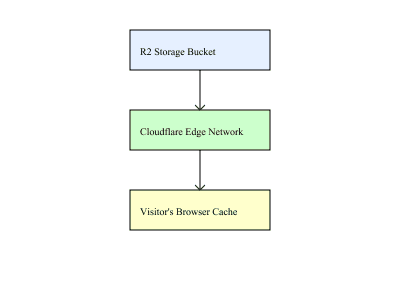
Flow: R2 stores the video → Cloudflare caches and delivers it via nearby edge servers → the visitor’s browser caches it locally. The result: the video is downloaded once and reused, saving bandwidth and improving speed.
3 MB Video Load Times: Typical Host vs Cloudflare R2
| 4G Speed | Typical Web Host (no CDN) |
Cloudflare R2 + Edge Cache |
|---|---|---|
| Poor 4G (~5 Mb/s) | ~5–6 s to full load ~1.0–1.5 s before playback starts |
~4–5 s to full load ~0.6–1.0 s start-play |
| Average 4G (~20 Mb/s) | ~1.5–2 s to full load ~0.5–0.7 s start-play |
~1.0–1.2 s to full load ~0.2–0.5 s start-play |
| Good 4G (~50 Mb/s) | ~0.7–1.0 s to full load ~0.3–0.5 s start-play |
~0.4–0.6 s to full load ~0.15–0.3 s start-play |
Note: “Start-play” assumes the video begins once the first ~200–300 KB arrives. With Cloudflare edge caching, playback feels near-instant compared to a standard host.
Bottom Line
Cloudflare R2 video hosting + edge caching turns heavy video into “download once, play everywhere.” Simple setup, big gains in speed and cost — provided you keep your video files lightweight and it's used in line with our business website hosting solutions
Disclaimer
Cloudflare and Cloudflare R2 are trademarks of Cloudflare, Inc. This post reflects our experience; we’re not affiliated with or endorsed by Cloudflare.